Every bridge relays new contacts on its own. What differs is how WP Sync learns that something is new. Push sources tell your site straight away. Polled sources are asked every five minutes.
Push sources fire immediately:
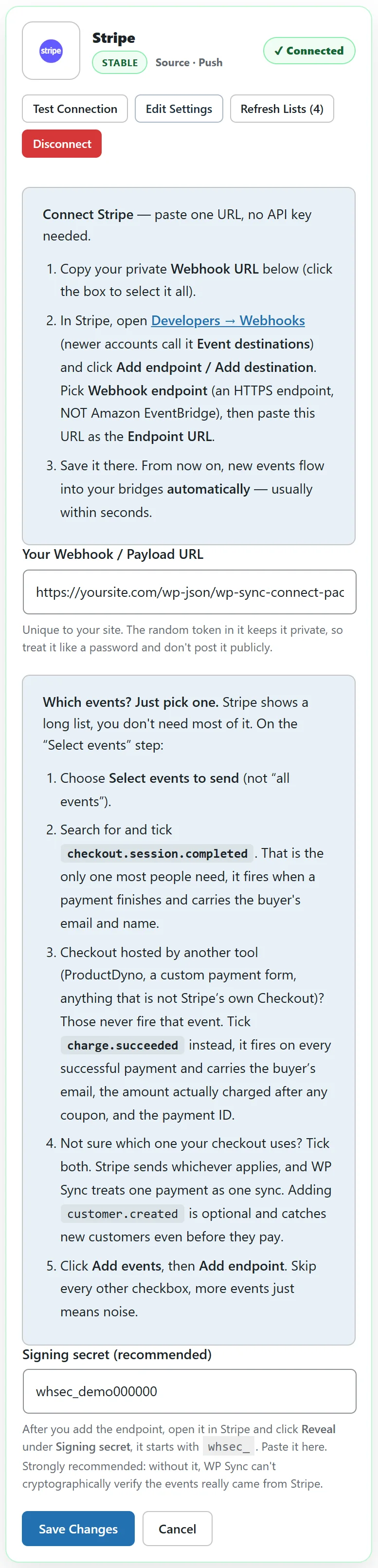
The other app sends the event to your site the instant it happens. This covers WordPress forms, Webhook Connect, WooCommerce and the other plugins on your site, Stripe, PayPal, Shopify and the other carts, Calendly and Cal.com, Facebook and Instagram Lead Ads, course platforms, the affiliate marketplaces including WarriorPlus and JVZoo, the Events cards and ResultsAiX Payments. Their cards say Push.
Push autoresponders:
Fourteen built in email apps push too: Acumbamail, Brevo, Drip, Encharge, Flodesk, Loops, MailPoet, Mautic, Moosend, Ortto, Sender.net, Sendiio, SendX and Sendy.
- Brevo, Drip, Flodesk, SendX and Sendiio create their webhook automatically when you connect.
- Loops, Sender.net, Acumbamail, Moosend, Sendy, Encharge and Ortto show numbered copy and paste steps in a Use as a source box on the card.
- MailPoet runs on the same site, so it needs no webhook at all.
- Mautic sends through its own webhook, which you add in Mautic using the URL on its card.
Polled sources are checked every five minutes:
WordPress runs a check every five minutes. For each enabled bridge with a polled source, it asks the source what is new since the last check and relays anything it finds. Email apps return contacts added since then. Google Sheets returns rows added since then. Zoom and GoToWebinar return new registrants. The RSS Feed returns new items.
Seeing the poll at work:

At the top of the Bridges tab, a short line shows the state of the five minute check.
- A green Watching line with the time of the last sweep means all is well.
- First sweep runs within 5 minutes appears on a brand new install.
- A red Sweep overdue line means the check has not run for over 15 minutes, so polled bridges are waiting.
Keeping the poll on time:
WordPress runs scheduled tasks when somebody visits the site. On a very quiet site the check can drift. The steady fix is a server cron job that calls your site's wp-cron.php every five minutes, which your host can set up in a minute. Diagnostics shows the next scheduled run under Cron Status.
Run Sync Now:
On the Bridges tab, Run Sync Now runs the check straight away instead of waiting. It also delivers any delayed or dripped contacts that are due. When it finishes it says Sync complete. Check Activity Log.
No double sends:
Push events carry a stable ID, so if an app sends the same event twice, it is processed once. Polled email apps are also checked against recent deliveries, so a contact seen again within 30 days is not sent twice.
A real example:
yoursite.com has both kinds. Stripe buyers arrive in ActiveCampaign within seconds of paying. Mailchimp subscribers reach beehiiv within five minutes. When the owner wants to see a Mailchimp test contact go across right now, they click Run Sync Now.
Which kind is my source:
- On the Connections tab, a card with Push under its name is a push source.
- In the Training matrix, push sources carry a PUSH badge.
- Everything else that can be a source is polled every five minutes.
What happens on the very first check:
When a bridge with a polled source is created, WP Sync notes the time. Each check after that relays contacts added since the previous check. That is what keeps a new bridge from sweeping in a whole list.
Push sources and a sleeping site:
A push source wakes your site itself, because the other app calls your site directly. That is why push sources stay instant even on a quiet site, while polled sources depend on the five minute check.
Tips:
- Testing a polled source? Add the contact, then click Run Sync Now.
- If the heartbeat turns red, ask your host for a real cron job on wp-cron.php.