These connections ship inside WP Sync core, so every licensed site has all of them without a pack. The plugin counts them from its own code, so the numbers below are the ones you will see on the Add-ons and Training tabs.
The full list:
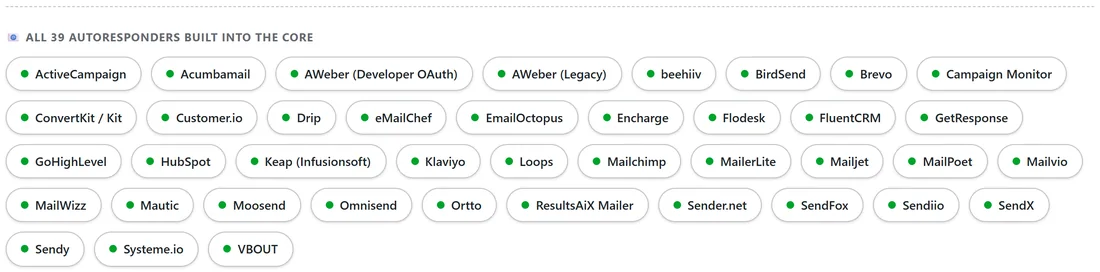
- ActiveCampaign, Acumbamail, AWeber (Developer OAuth), AWeber (Legacy), beehiiv, BirdSend, Brevo, Campaign Monitor, ConvertKit or Kit, Customer.io.
- Drip, eMailChef, EmailOctopus, Encharge, Flodesk, FluentCRM, GetResponse, GoHighLevel, HubSpot, Keap (Infusionsoft).
- Klaviyo, Loops, Mailchimp, MailerLite, Mailjet, MailPoet, Mailvio, MailWizz, Mautic, Moosend.
- Omnisend, Ortto, ResultsAiX Mailer, Sender.net, SendFox, Sendiio, SendX, Sendy, Systeme.io, VBOUT.
That is 40 cards for 39 apps, because AWeber has two cards.
Which ones can be a source:
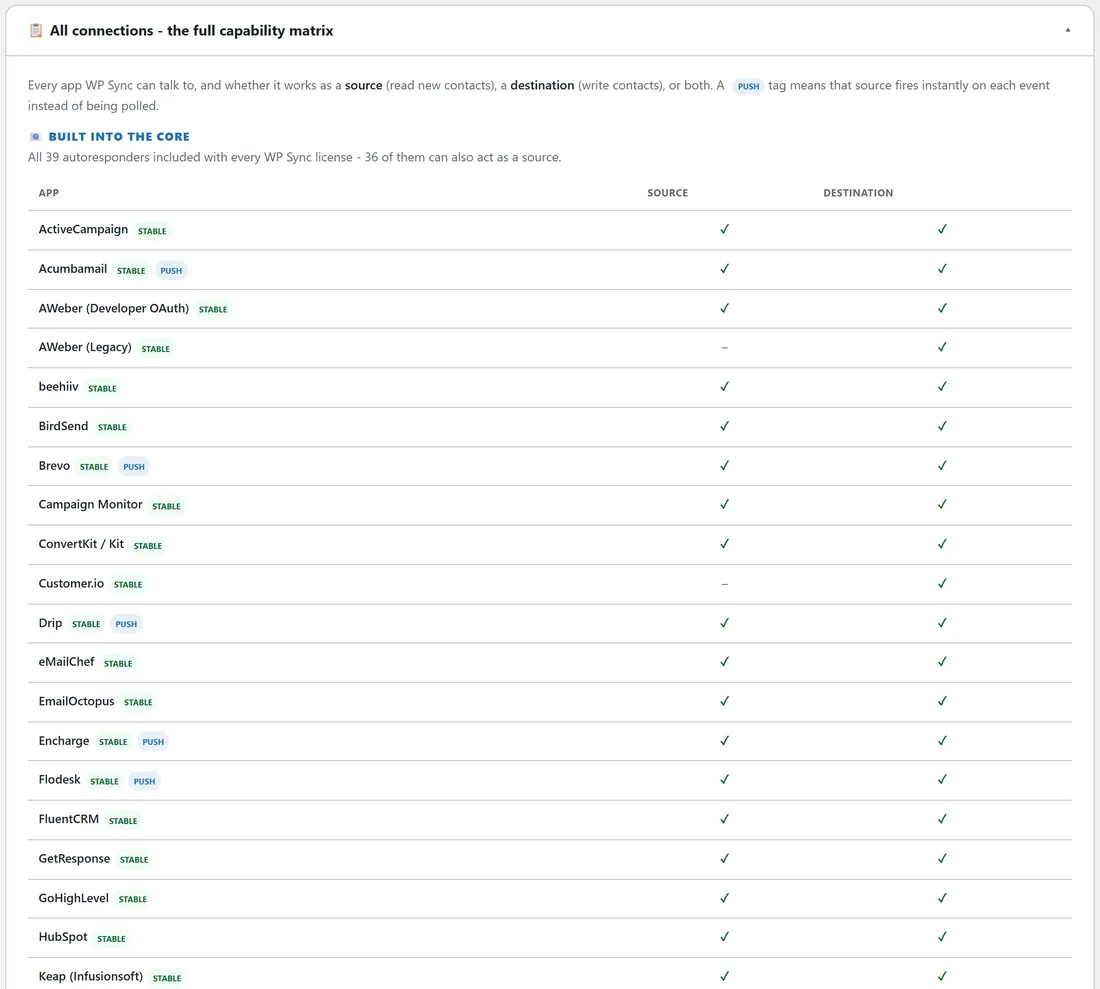
36 of the 40 cards can read new contacts and act as a source. Four cards are destination only: AWeber (Legacy), Customer.io, Mailjet and SendFox. All 40 can act as a destination. The Training tab says the same thing as 36 of the 39 apps, because AWeber counts once and it can be a source through its Developer OAuth card.
Instant push autoresponders:
Fourteen built in apps deliver new subscribers to your site the moment they join, instead of waiting for the five minute poll: Acumbamail, Brevo, Drip, Encharge, Flodesk, Loops, MailPoet, Mautic, Moosend, Ortto, Sender.net, Sendiio, SendX and Sendy. They carry a PUSH badge in the Training matrix. See Instant Push Versus The Five Minute Poll for how each one is set up.
More than adding to a list:
Many built in apps can do more than add a contact. ActiveCampaign, Mailchimp and Kit, for example, can also unsubscribe, add a tag, remove a tag or update fields only. AWeber (Developer OAuth) adds a Delete from this list action. The builder shows only the actions each app supports. See Destination Actions Beyond Adding To A List.
Status badges:
Every built in connection is marked STABLE. A BETA badge, when one appears on any card, means the connection works and is still being confirmed on more account setups. A connected beta card has a button to confirm it works for you and a link to tell the team about a problem.
Two that run on your own server or site:
Mautic is self hosted and works both ways. ResultsAiX Mailer runs inside the same WordPress site, so it needs no key at all. Both have their own article, Mautic And ResultsAiX Mailer Built In.
AWeber's two cards:
Use AWeber (Developer OAuth) when you want AWeber as a source or want tag and field actions. AWeber (Legacy) uses a web form ID and works as a destination only. If you run more than one AWeber login, see Running Two Accounts Of The Same App.
A real example:
yoursite.com moved its newsletter from Mailchimp to beehiiv. Both are in the core, so one bridge, Newsletter to beehiiv, does the job with no pack at all.
Which list each app offers:
- ActiveCampaign, Brevo, GetResponse, Sendy and most others: their lists.
- Mailchimp: audiences, with tags and fields on each audience.
- Kit: forms for adding, and tags for tag actions. Its unsubscribe works on the whole account.
- MailerLite: groups.
- Mautic: segments.
- beehiiv: All subscribers on your publication, plus its automations.
- ResultsAiX Mailer, FluentCRM and MailPoet: the lists in that plugin on your own site.
Choosing between similar apps:
If you run two email apps, pick the one that should send the emails as the destination, and the one that collects contacts as the source. A bridge only copies contacts. Each app keeps its own sequences, tags and unsubscribe rules.
Apps on your own site:
FluentCRM, MailPoet and ResultsAiX Mailer live inside WordPress, so they need no key. Their cards connect when the plugin is active.
Tips:
- The roster grows between versions. The Add-ons tab chip list and the Training matrix always show the exact set on your site.
- Search the Connections tab by app name rather than scrolling 40 cards.