Autopilot checks Google, Meta and the other networks every morning against the sales that really happened on your site, and lists what is worth doing. It never changes anything by itself: you decide.
Where to find it:
- At the top of the Dashboard, when it has found something.
- On the Results screen, in the Autopilot card.
What it looks for:
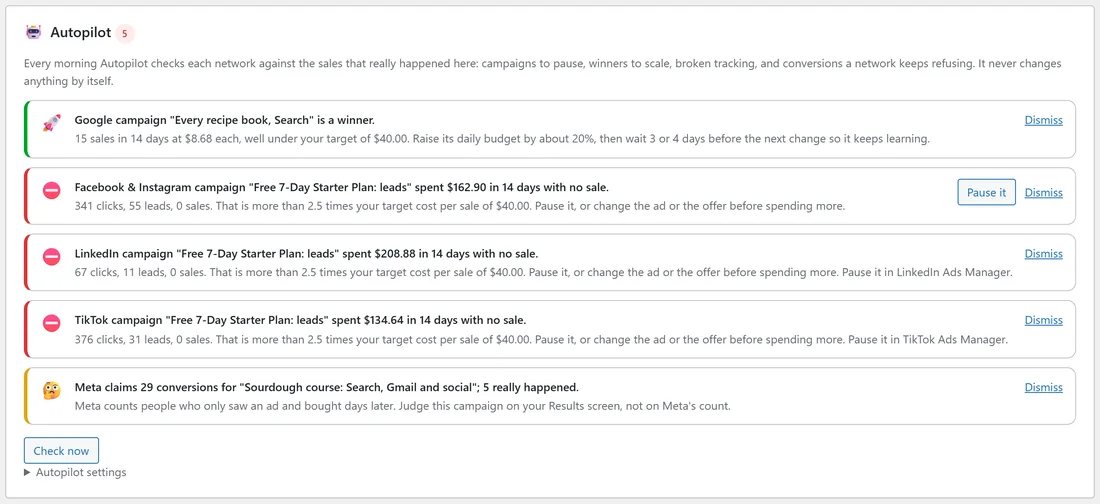
- Campaigns spending with no sales: at least 30 clicks and more than 2.5 times your target cost per sale spent in the last 14 days, with no sale. The line shows the clicks, leads and sales.
- Winners worth more budget: 3 or more sales in 14 days at 60% of your target cost per sale or less. It suggests raising the daily budget by about 20%, then waiting 3 or 4 days before the next change.
- Tracking that stopped working: a network reports clicks, but none reached your site with its click id.
- Conversions a network keeps refusing.
- Big gaps between what a network claims and what really happened, for example "Meta claims 29 conversions; 5 really happened".
What you can do with each line:
- Pause it: one click pauses the campaign on Google or Meta. For the other networks the line says to pause it in that network's ads manager.
- Dismiss: hides the line.
- Check now: runs the check straight away.
Autopilot settings:
Open Autopilot settings:
- Target cost per sale: the most you are happy to spend on ads for one sale. Empty means your average sale value over the last 90 days (above that, a sale loses money).
- Email me once a day when there is something new, and Send it to (empty uses the alert address in Settings, Notifications).
- Save.
Lead campaigns:
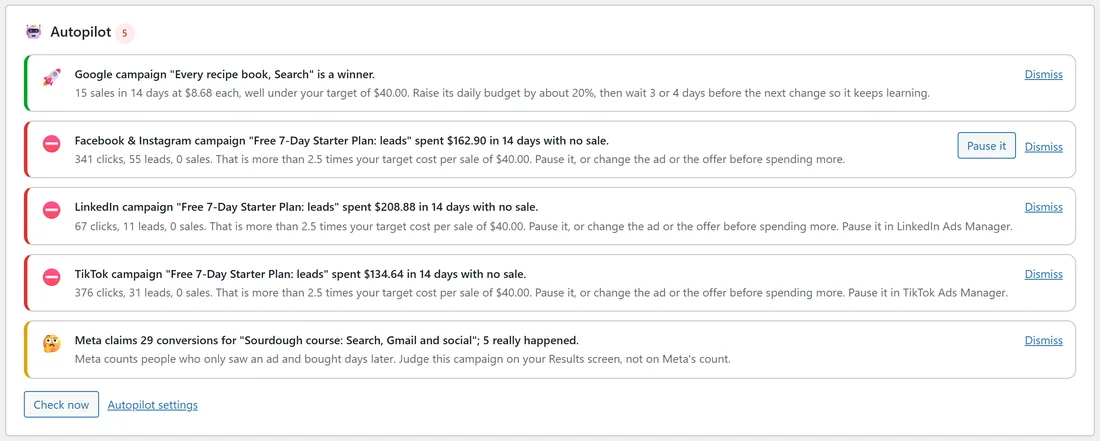
Autopilot judges every campaign on its sales. A campaign built to collect leads, such as a free guide, can show as spending with no sale even when it brings plenty of leads; its line shows the leads too. For those, judge by the cost per lead on Results, and Dismiss the line if the leads are worth it.
A real example:
On yoursite.com, Autopilot found five things this morning: "Every recipe book, Search" is a winner (15 sales in 14 days at $8.68 each, under the $40 target), so the owner raised its budget by 20%. The free guide campaigns on Facebook, LinkedIn and TikTok showed no sales, but 55, 11 and 31 leads; the owner dismissed Facebook and TikTok, which bring leads cheaply, and paused LinkedIn in LinkedIn Campaign Manager. The Meta claims gap line was a reminder to trust Results.
Tips:
- Set your Target cost per sale. Without one, Autopilot uses your average sale value, which may be higher than you want to pay.
- Make one change at a time and give it 3 or 4 days.