Meta audiences let you show ads to people who already know you, keep buyers out of ads for new customers, and let Meta find people like your best customers. ADs makes them in your own ad account and keeps them fresh every day.
Where to find it:
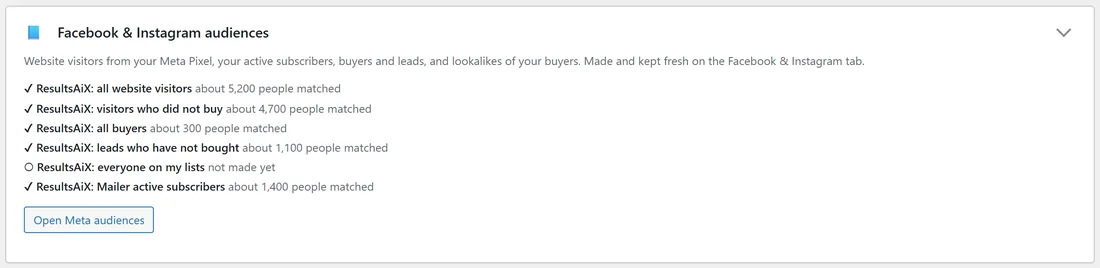
Open Networks, Facebook & Instagram, step 4, Audiences from your own customers (optional). The Audiences tab has a Facebook & Instagram audiences card with a summary and Open Meta audiences.
Before you start:
Meta asks you to accept its Custom Audience terms once per ad account. The link, accept them here, is at the top of step 4.
Website visitors (retargeting):
With the Meta Pixel on every page (see Ad Network Tags On Every Page), press Make these audiences on Meta. ADs makes:
- ResultsAiX: all website visitors: everyone who visited any page of this site in the last 180 days (Meta's longest).
- ResultsAiX: visitors who did not buy: visited, but never reached a thank-you page.
They are filled by your pixel, including what it already saw. A tick and "about N people" show once they exist.
Your subscribers and customers:
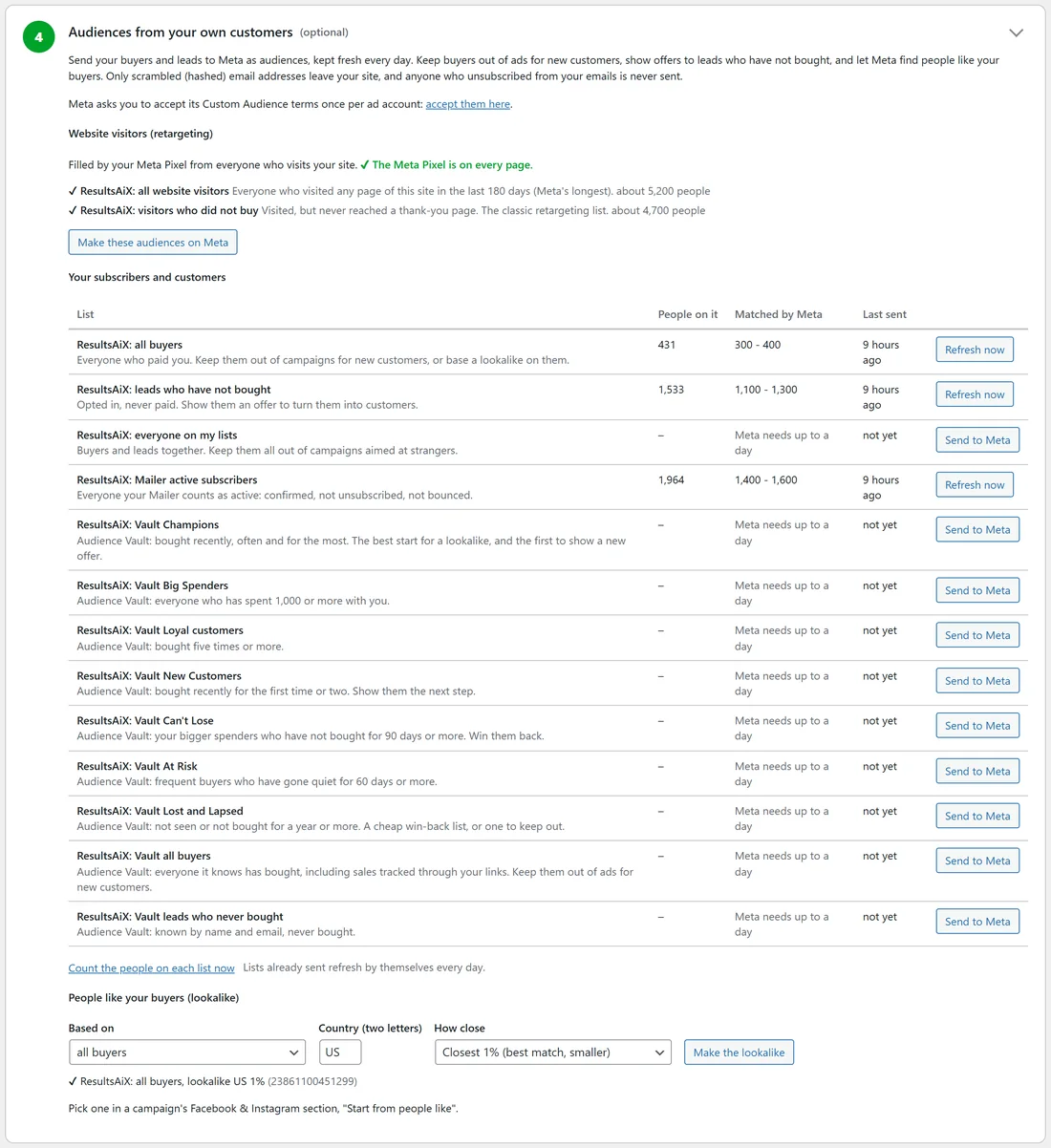
The table lists each list with People on it, Matched by Meta, and Last sent:
- ResultsAiX: all buyers: everyone who paid you.
- ResultsAiX: leads who have not bought: opted in, never paid.
- ResultsAiX: everyone on my lists: buyers and leads together.
- ResultsAiX: Mailer active subscribers, when the Mailer is on your site.
- With Audience Vault: Vault Champions, Big Spenders, Loyal customers, New Customers, Can't Lose, At Risk, Lost and Lapsed, all buyers, and leads who never bought.
Press Send to Meta on a list. Once sent, the button reads Refresh now and the list refreshes by itself every day. Matched by Meta shows Meta's own range once it has matched (it needs up to a day). Anyone who unsubscribed from your emails is never sent. Count the people on each list now refreshes the numbers.
People like your buyers (lookalike):
Once Meta has matched at least 100 people on a list:
- Choose Based on: a list you sent, such as all buyers or Vault Champions.
- Type the Country (two letters).
- Choose How close: Closest 1% (best match, smaller) or Wider 5% (more reach).
- Press Make the lookalike.
Your lookalikes are listed underneath with their ids. Pick one in a campaign's Facebook & Instagram section, under Start from people like.
Using them in a campaign:
In a campaign's Facebook & Instagram section, part B: Your audiences (Only them or Keep out for each list), Keep out of this campaign, and Start from people like.
A real example:
yoursite.com made both website audiences (about 5,200 and 4,700 people) and sent all buyers (431), leads who have not bought (1,533) and Mailer active subscribers (1,964). Meta matched 300 to 400 buyers, enough for a lookalike: "ResultsAiX: all buyers, lookalike US 1%". The course campaign starts from that lookalike and keeps buyers out.
Tips:
- Vault Champions or Big Spenders make the strongest lookalikes, because they are your best buyers.
- Keep all buyers out of every campaign for new customers.
- See Audience Vault: Your Best Customers As Ad Audiences for what each Vault segment means.