To know which ad made which sale, ADs records the click id each ad network adds to your links when someone lands, and links that visitor to their email when they fill in any form. When they buy, even days later, the sale is traced back to the ad.
Where to find it:
Open Settings, Settings and AI keys, Ad click tracking.
How it works:
- Someone clicks your ad. The network adds its click id to the link (gclid for Google, fbclid for Meta, ttclid for TikTok, li_fat_id for LinkedIn, epik for Pinterest, rdt_cid for Reddit, ScCid for Snapchat, and others), plus any UTM tags.
- ADs records the click on your landing page against a visitor id.
- When that visitor opts in or buys, ADs links the visitor id to their email.
- A lead or sale up to 90 days later is traced to the latest ad click from that person, and sent back to that network.
Every setting:
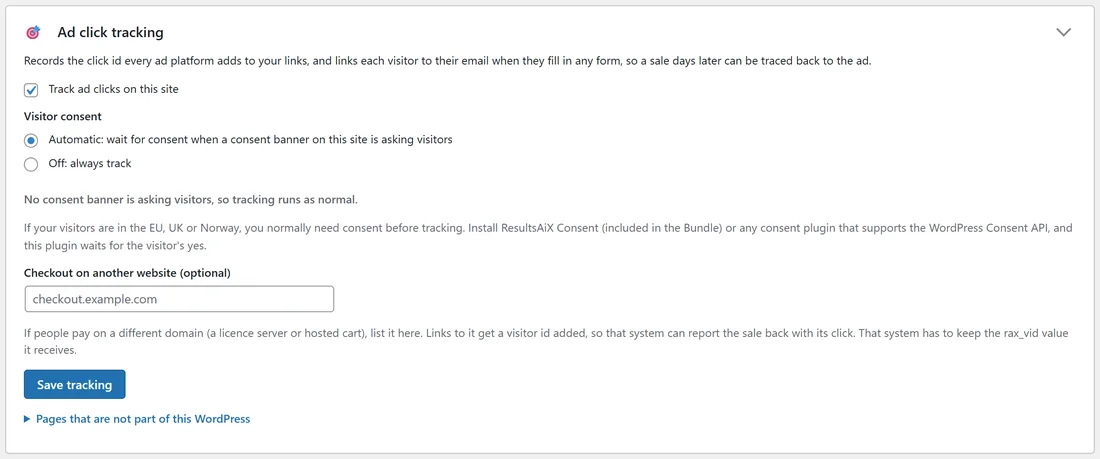
- Track ad clicks on this site: switches it all on.
- Visitor consent: Automatic: wait for consent when a consent banner on this site is asking visitors; or Off: always track. The line under it says whether a consent banner is asking visitors right now.
- Checkout on another website (optional): if people pay on a different domain (a licence server or hosted cart), list it. Links to it get a visitor id added (rax_vid), so that system can report the sale back with its click.
Press Save tracking.
Pages that are not part of this WordPress:
Static HTML sales pages on the same domain as this site can be tracked too. Open the line and paste the two lines shown just before the closing body tag on each page. It must be the same domain, for example yoursite.com/offer and yoursite.com/blog; a different domain cannot share the visitor cookie.
Where leads and sales come from:
ADs reads sales from ResultsAiX Funnels, Membership, the Mailer's sales ledger and WooCommerce, and leads from Funnels, the Mailer and Webinars, every few minutes. On a site where WP Conversion Tracker is the only place sales are recorded, ADs reads its sales instead (never as well, so no sale is counted twice). When ADs starts reading a plugin, it starts from its newest record, so older sales are not sent to the networks.
WP Conversion Tracker:
With WP Conversion Tracker on your site, ADs can pass ad click ids and UTM tags through every tracking link, not only the ones ADs made.
A real example:

A visitor clicked a Google ad for "sourdough course online" and landed on yoursite.com/sourdough-course/. Three days later they bought the course. Results, Where did they come from? shows both steps: the Google click with its campaign and keyword, then the purchase, and Google received the sale with its click id.
Tips:
- If your visitors are in the EU, UK or Norway, add a consent banner. ResultsAiX Consent works with ADs automatically, as does any plugin that speaks the WordPress Consent API.
- Tracking health on the Results screen shows that leads and sales are being read.