ADs has a secure REST API, so Claude Code or any tool you trust can plan a complete campaign and create it for you: keywords, ad groups, Search ads, social ads, audiences, countries and budgets. It talks to your site through the WordPress REST API, signed in as you.
Where to find it:
Open Campaigns, New campaign, Import a campaign plan, and the Let Claude Code build it tab.
Step by step:
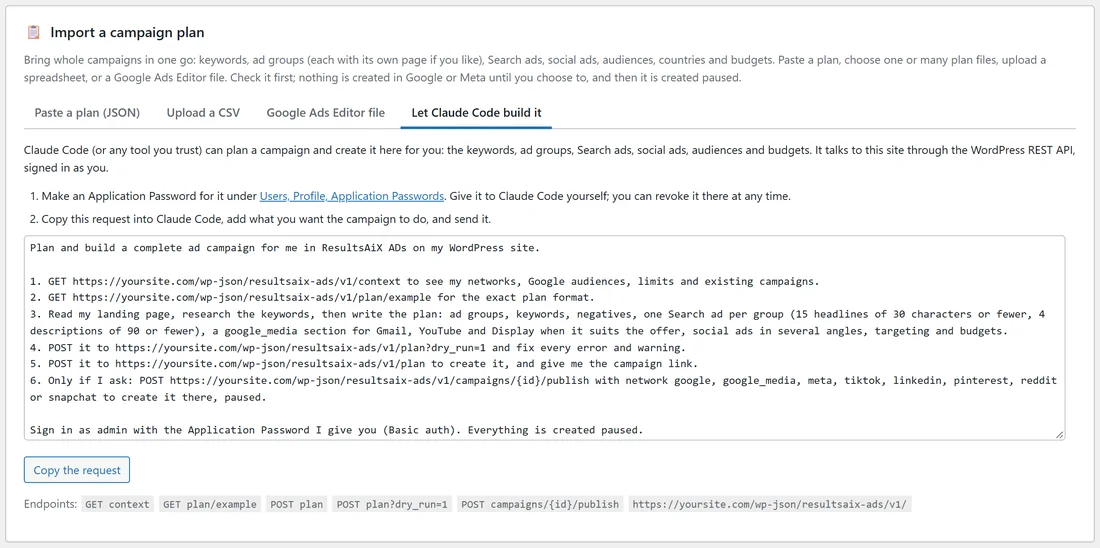
- Make an Application Password: in WordPress open Users, Profile, Application Passwords. Give it a name like "Claude Code" and copy the password. You can revoke it there at any time.
- On the Let Claude Code build it tab, press Copy the request.
- Paste the request into Claude Code, add what you want the campaign to do, and give it the Application Password yourself.
- Claude Code checks your context, writes the plan, checks it with a dry run, fixes anything, and creates it.
- Open the campaign in ADs to look it over, then create it on each network, paused.
What Claude Code uses:
All under yoursite.com/wp-json/resultsaix-ads/v1/:
- GET context: your networks, which are connected, your audiences, Google's limits and your existing campaigns.
- GET plan/example: the exact plan format.
- POST plan?dry_run=1: checks a plan and lists errors and warnings without saving anything.
- POST plan: creates the campaign and returns its link. Send { "campaigns": [ plan, plan ] } to create several at once, and give any ad group a landing_url to send it to its own page.
- POST campaigns/{id}/publish with network google, google_media, meta, tiktok, linkedin, pinterest, reddit or snapchat: creates it on that network, paused. With the Google Ads script, Google campaigns are handed to the script and created on its next run.
The copied request tells Claude Code to publish only if you ask it to.
Who can use it:
Only administrators with an active licence. Everything is created paused.
A real example:
The owner of yoursite.com pasted the request into Claude Code with: "Plan a Google Search campaign for every recipe book page on my site, $15 a day, US, UK and Canada." Claude Code read the context, wrote five ad groups with their own landing_url and keywords, ran a dry run, and created "Every recipe book, Search" in ADs.
Tips:
- Make one Application Password per tool, so you can revoke one without touching the others.
- Ask Claude Code to show you the plan before it posts it.
- The same plan format works in Import a campaign plan. See Import Campaign Plans (JSON, CSV Or Google Ads Editor).