ADs works on its own. When other ResultsAiX plugins are on the same site, it reads what they already store and puts it to work for your ads, so you never enter anything twice.
Where to see it:
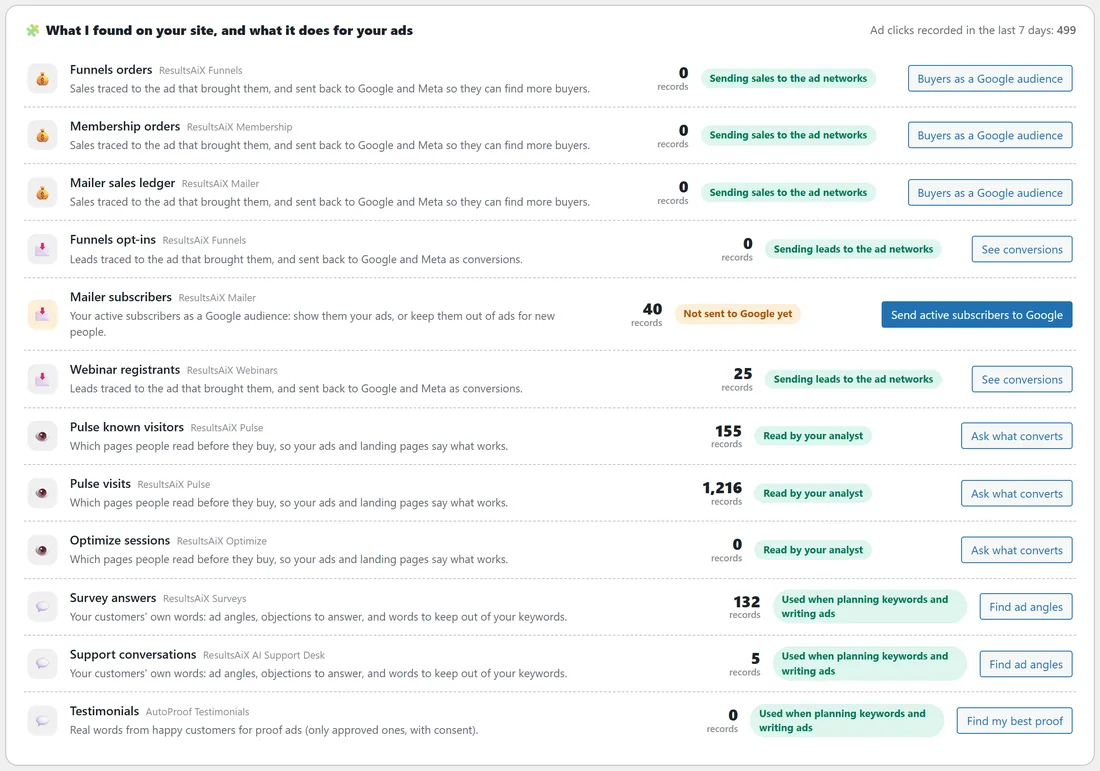
The Dashboard's What I found on your site, and what it does for your ads card lists each plugin ADs reads, how many records it has, what ADs does with it, whether it is in use, and the one button that puts it to work.
Sales: Funnels, Membership, the Mailer and WooCommerce:
Funnels orders, Membership orders, the Mailer's sales ledger and WooCommerce orders are traced to the ad that brought them and sent back to Google, Meta and the other networks so they find more buyers. Buyers become an audience. The button reads Send sales to Google until they are sent, then Buyers as a Google audience.
Leads: Funnels, the Mailer and Webinars:
Funnels opt-ins, Mailer subscribers and Webinar registrants are traced to the ad that brought them and sent back as conversions. New Mailer subscribers who opted in count as leads; people imported by CSV or sync do not. Mailer active subscribers also go to Google, Meta and the other networks as an audience: Send active subscribers to Google. Anyone who unsubscribed, bounced or complained is never sent, and is removed from lists already sent.
WP Conversion Tracker:
- ADs makes one short tracking link per network for a campaign, in a "ResultsAiX ADs" folder, with the right tags on it, and shows each link's clicks, leads and sales on the campaign screen.
- Ad click ids (gclid, fbclid, ttclid and the rest) are kept through the tracker's redirect, so a sale through a tracking link is still traced to its ad.
- Facebook and Instagram campaigns can send clicks through your tracking link.
- On a site where WP Conversion Tracker is the only place sales are recorded, ADs reads its sales too. Where Funnels, Membership, the Mailer or WooCommerce record sales, it does not, so no sale is counted twice.
Audience Vault:
Every Vault segment, from Champions and Big Spenders to At Risk and Can't Lose, becomes a customer list for Google, Meta and the other networks, and the start of a lookalike. See Audience Vault: Your Best Customers As Ad Audiences.
WP Sync:
WP Sync moves your leads and sales to your autoresponders and services; ADs sends them to the ad networks. If both send sales to Meta, they use the same event ids, so Meta counts each sale once. Leads WP Sync puts into the Mailer become Mailer subscribers, and from there ADs audiences.
Pulse and Optimize:
Pulse known visitors and Pulse visits, and Optimize sessions, show which pages people read before they buy. The analyst reads them to tell you which pages and paths turn visitors into buyers (Ask what converts). They are never sent to an ad network.
Surveys, Support Desk and Testimonials:
Survey answers, Support conversations and Testimonials are your customers' own words: ad angles, objections to answer, and words to keep out of your keywords. They are used when planning keywords and writing ads. Only approved testimonials with consent are used. Find ad angles and Find my best proof ask the analyst for you.
A real example:
On yoursite.com, What I found lists Mailer subscribers (40), Webinar registrants (25), Pulse visits (1,216), Survey answers (132) and Support conversations (5), each with what it does. Funnels orders read Sending sales to the ad networks. Mailer subscribers read Not sent to Google yet, with Send active subscribers to Google next to it.
Tips:
- Press the button on any line that says Not sent yet. It goes straight to the right place.
- Ad clicks recorded in the last 7 days, at the top of the card, shows that tracking is working.