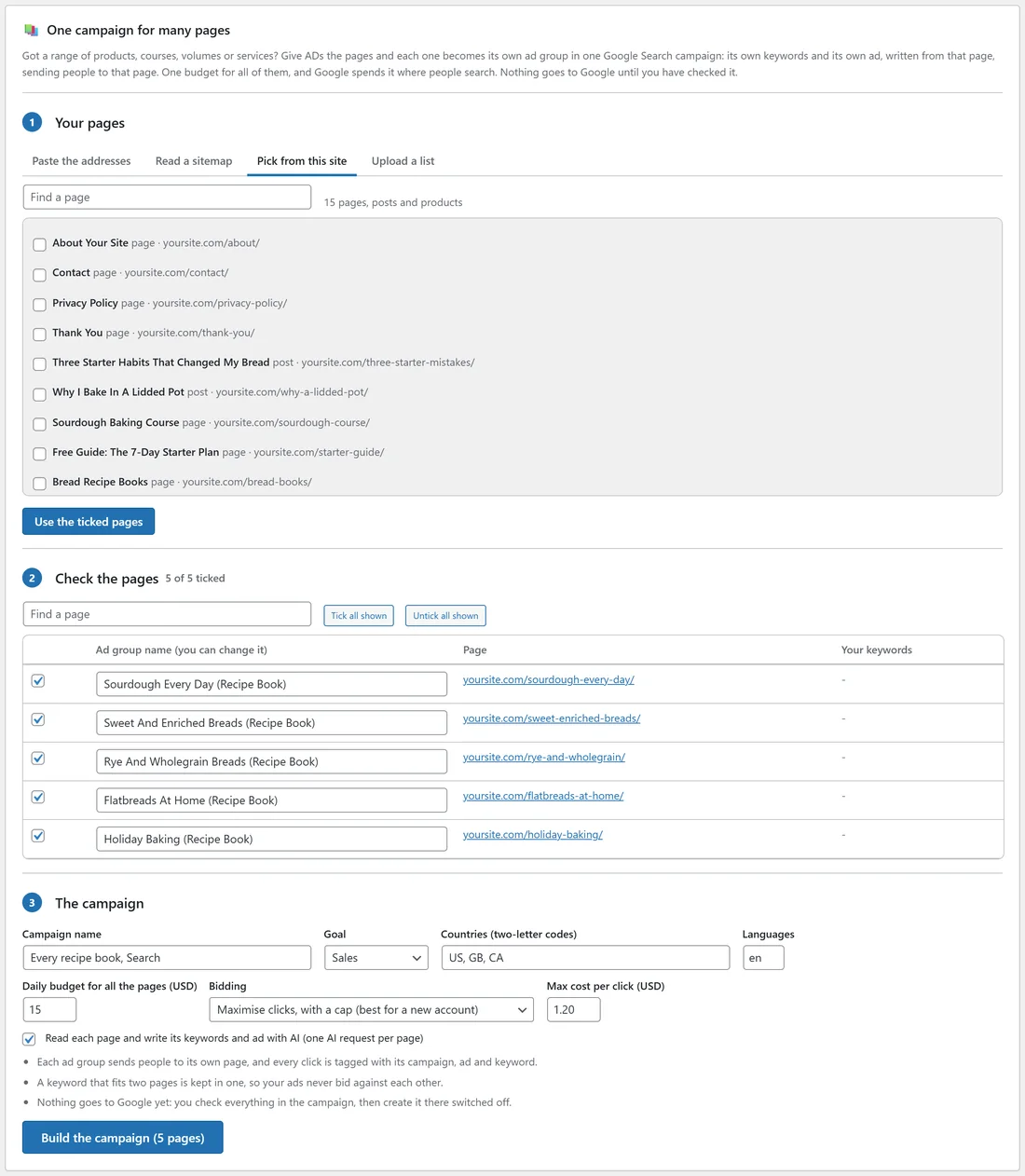
One campaign for many pages turns a range of products, courses, books or services into one Google Search campaign. Each page becomes its own ad group: its own keywords and its own ad, written from that page, sending people to that page. One budget covers them all, and Google spends it where people are searching.
Where to find it:
Open Campaigns, New campaign and scroll to One campaign for many pages.
- Your pages:
Give ADs your pages, four ways:
- Paste the addresses: one on each line. Add a title and your own keywords after commas if you like: address, title, keyword one; keyword two.
- Read a sitemap: paste the sitemap address, or just the site's address and ADs finds it. A sitemap index is followed to its page sitemaps; image and video sitemaps are skipped.
- Pick from this site: tick your pages, posts or products, then press Use the ticked pages. Type in Find a page to filter.
- Upload a list: a spreadsheet (CSV) or text file with a first row naming the columns url (required), title and keywords (separated by ; or |).
Press Find the pages.
- Check the pages:
Every page is listed with the name its ad group will have (change any name), its address and your keywords. Policy, contact, cart, thank-you and similar pages come unticked. Tick or untick any, use Tick all shown and Untick all shown, or find one by typing in Find a page. The count shows how many are ticked.
- The campaign:
- Campaign name, Goal (Sales, Leads or Traffic), Countries (two-letter codes) and Languages.
- Daily budget for all the pages, Bidding (Maximise clicks with a cap, Manual CPC, or Maximise conversions) and Max cost per click.
- Read each page and write its keywords and ad with AI (one AI request per page). Without an AI key, the keywords come from your list (or each page's title) and you write the ads.
Press Build the campaign (N pages).
While it builds:
Keep the tab open. The pages are built three at a time, with a progress bar, about 10 to 30 seconds a page. Each page is read and gets 10 to 30 long-tail keywords from its own topics and its own responsive search ad. A name that came from the address becomes the page's real title.
At the end ADs makes sure no keyword is in two ad groups (it stays in the ad group whose page it fits best, so your ads never bid against each other), and adds the usual negative keywords plus the ones the pages suggested, never one that would switch off one of your keywords.
The campaign screen:
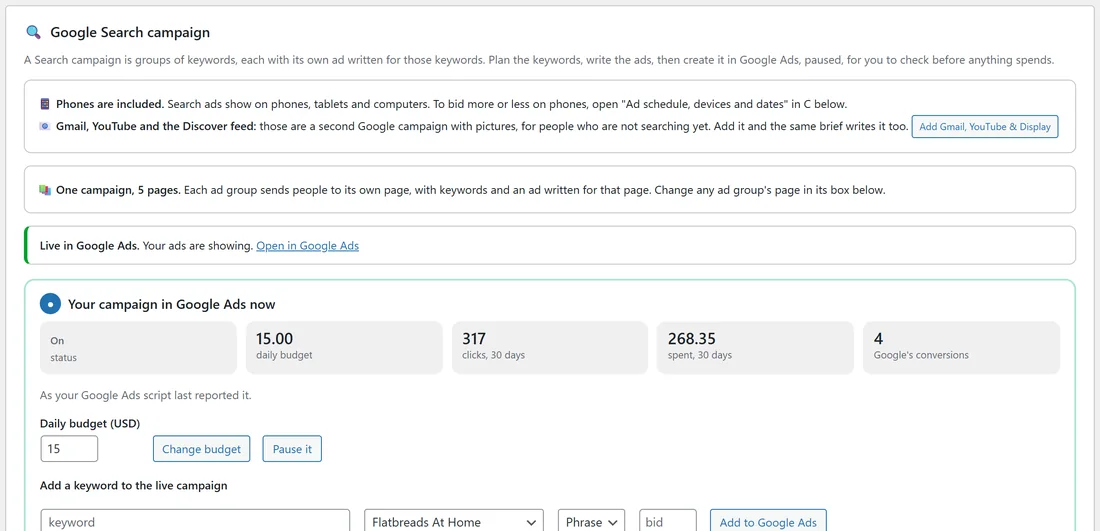
Nothing goes to Google yet. Open the campaign: it says "One campaign, N pages", and every ad group shows its page. Create it in Google Ads switched off as usual.
- If a build was interrupted or a page could not be read, the campaign says how many are left and Build the rest now carries on.
- Plan every page again reads every page again and rewrites its keywords and ad; keywords you added by hand stay.
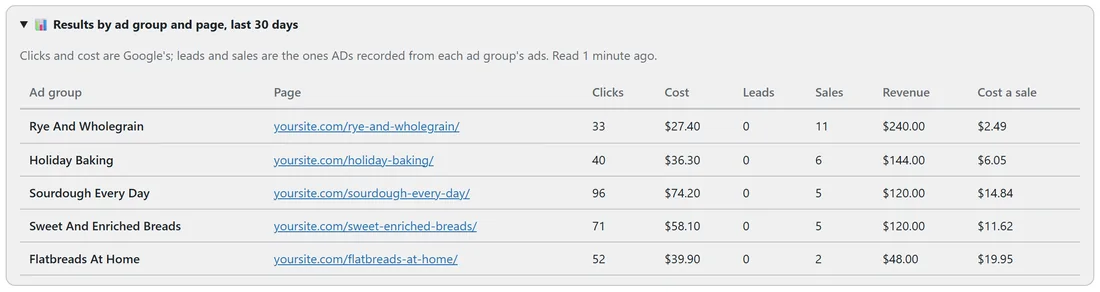
- Results by ad group and page shows each page's clicks, cost, leads, sales and cost of a sale once it runs.
Limits:
One campaign takes up to 300 pages. Google takes about 9,000 keywords, ad groups and ads in one campaign; ADs says so before it gets that far, so you can untick some keywords or split the pages over two campaigns.
A real example:
yoursite.com sells five recipe books, each on its own page. The owner picked them on Pick from this site, named the campaign "Every recipe book, Search", set US, GB, CA, $15 a day and a $1.20 cap, and pressed Build the campaign (5 pages). Each book became its own ad group, such as Holiday Baking with "stollen recipe" and Sourdough Every Day with "sourdough recipe book". After a month, Results by ad group and page shows Rye And Wholegrain as the best seller.
Tips:
- Give each page a clear title. It becomes the ad group's name and shapes its keywords.
- Add new products later as new ad groups on the campaign screen.
- See Planning Google Keywords and Google Search Ads And Creating The Campaign for the parts that are the same as any Search campaign.