The quick builder makes a whole campaign from one page address, with no chat. ADs reads the page, writes five ads in five angles in your voice, checks each one against the ad rules, and for Google plans the keywords and writes the Search ads. Nothing is published: you check everything on the campaign screen first.
Where to find it:
Open Campaigns, New campaign. Scroll to the card Or: quick build from a page, no chat.
Step by step:
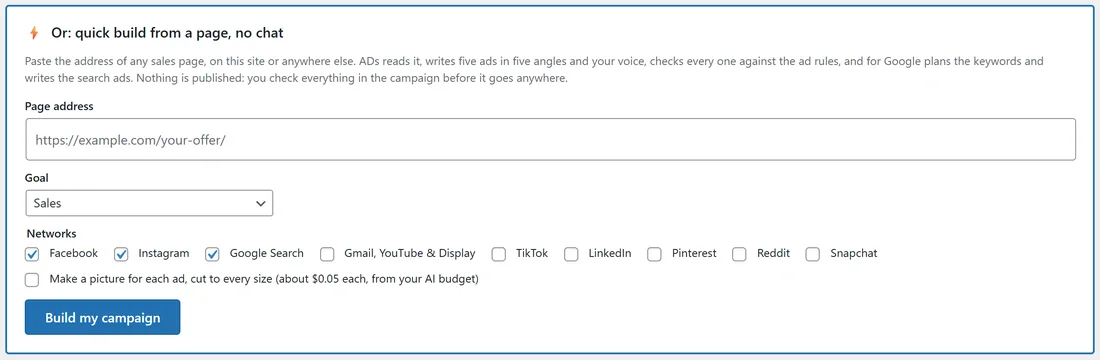
- Paste the Page address. It can be a page on this site or a page anywhere else.
- Choose the Goal: Sales, Leads (opt-ins) or Traffic.
- Tick the Networks: Facebook, Instagram, Google Search, Google Gmail, YouTube & Display, TikTok, LinkedIn, Pinterest, Reddit and Snapchat.
- Optional: tick Make a picture for each ad, cut to every size. The price per picture is shown next to it, taken from your AI budget.
- Press Build my campaign. A progress window shows each part as it is done.
What ADs does with the page:
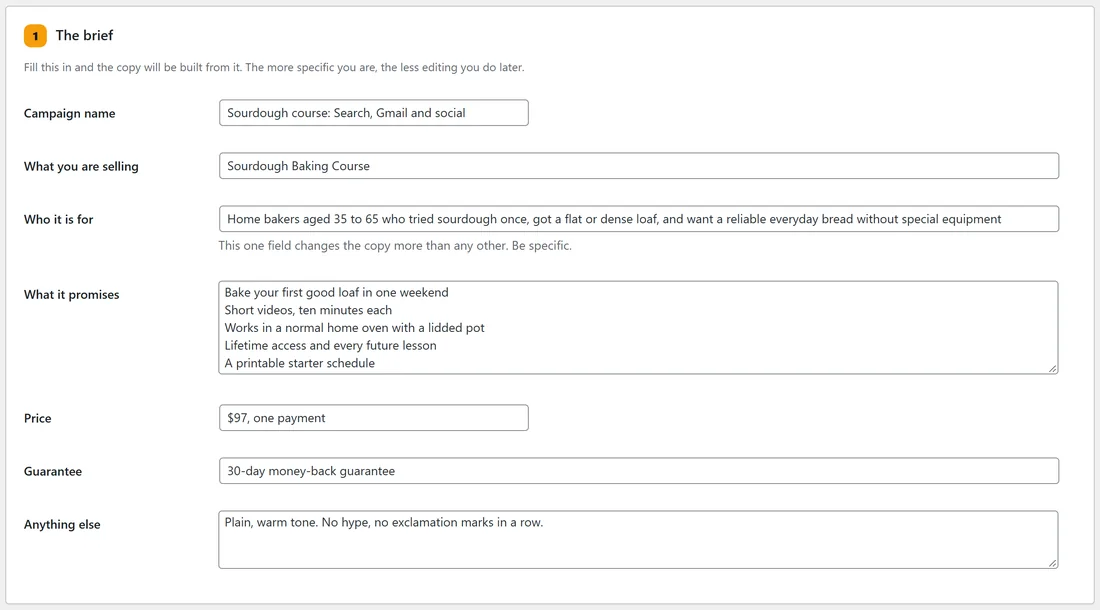
- Reads the headline, the promise, the price, the guarantee and the benefits into the campaign's brief. A page on this site is read straight from WordPress.
- Pages that build themselves with JavaScript are read too: when a page sends back almost no text, ADs reads the rendered page instead.
- Writes five ads in five angles: curiosity, pain, proof, direct offer and story, in your active voice.
- Checks every ad against the Compliance rules as it is written.
- For Google Search, plans the keywords and writes one Search ad per keyword group.
Every setting:
- Page address: the page the ads send people to. It becomes Where the ad sends people on the campaign.
- Goal: Sales optimises for purchases, Leads for opt-ins, Traffic for clicks. You can change it later under Where it runs.
- Networks: the copy is written to the tightest character limit across everything you tick, so one set works everywhere.
- Make a picture for each ad: needs an image engine under Settings, AI Providers. Without one, the line tells you to add it first.
Without an AI key the page is still read into the brief, but no ads are written. The card says so.
A real example:
The owner of yoursite.com pasted https://yoursite.com/sourdough-course/, chose Sales, and ticked Facebook, Instagram, Google Search and TikTok. ADs filled the brief with "Sourdough Baking Course", the benefits from the page and the guarantee line, wrote five ads such as "Why loaves spread flat" (curiosity) and "Your first good loaf" (pain), and planned three Google keyword groups.
Tips:
- Better pages make better ads. If the brief misses something, add it under The brief and press Regenerate.
- Want to talk it through first, with budgets and countries? Use Build A Campaign With AI.
- Selling many products from many pages? Use One Campaign For Many Pages.