For any campaign with Facebook or Instagram ticked, the campaign screen has a Facebook & Instagram campaign section. It creates the campaign, the ad set and every ad in Meta Ads Manager, paused, in one step.
Where to find it:
Open the campaign and scroll to Facebook & Instagram campaign. It has three parts: A. Which ads, B. Who sees them, and the budget, and C. Create it in Meta Ads Manager.
A. Which ads:
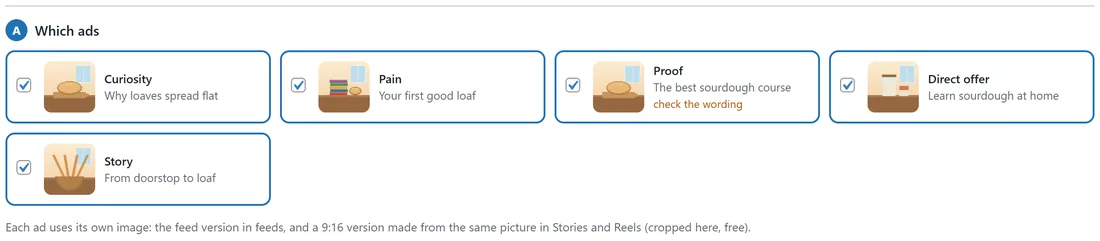
Tick the ads to include. Each ad needs a picture. Each ad uses its own image: the feed version in feeds, and a 9:16 version made from the same picture in Stories and Reels (cropped here, free). A flagged ad shows check the wording.
B. Who sees them, and the budget:
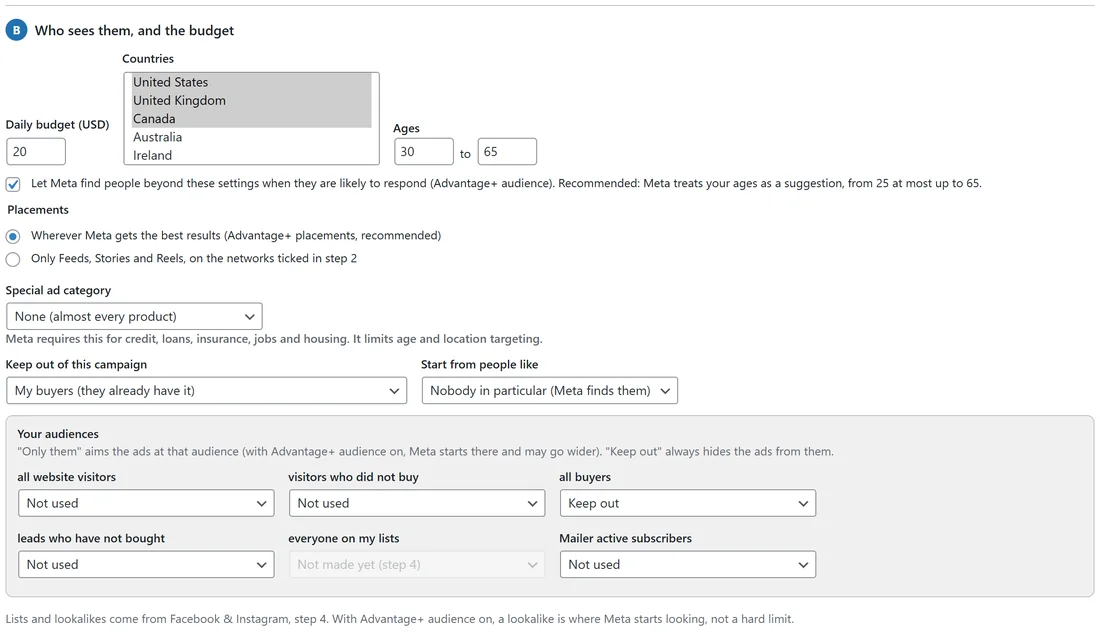
- Daily budget, in your ad account's currency.
- Countries and Ages (from and to).
- Advantage+ audience: Let Meta find people beyond these settings when they are likely to respond. With it on, Meta treats your ages as a suggestion; with it off, your targeting is a firm limit.
- Placements: Wherever Meta gets the best results (Advantage+ placements, recommended), or Only Feeds, Stories and Reels, on the networks ticked in step 2.
- Special ad category: None for almost every product. Meta requires one for credit, loans, insurance, jobs and housing; it limits age and location targeting.
- Keep out of this campaign: for example My buyers (they already have it).
- Start from people like: Nobody in particular (Meta finds them), or a lookalike you made.
- Your audiences: for each list, Only them or Keep out. Keep out is always honoured; Only them is where Meta starts when Advantage+ audience is on.
With WP Conversion Tracker on your site, you can also send the clicks through your tracking link.
C. Create it in Meta Ads Manager:

- Press Save these settings to keep them.
- Press Create in Meta Ads Manager (paused).
Meta checks the campaign first. If Meta refuses any part, everything already made is removed again, so nothing half-built is left in your ad account. Pressing it again makes a second copy, and the button then reads Create again in Meta (paused); ADs reminds you before it does.
What it optimises for:
- Leads and Sales campaigns optimise for your pixel's Lead or Purchase event, so Meta looks for people who act, not just people who click.
- Traffic optimises for landing page views (link clicks without a pixel).
- Engagement for likes, comments and shares on the ad; Awareness for reach.
Every click carries its campaign, ad set and ad, so Results can show which ad made which sale.
Run it from here:
Once created, Run it from here at the top of the section reads the campaign from Meta and shows whether it is on or paused and its daily budget. Switch it on (ADs asks first, because that starts spending, and switches on the campaign, its ad set and its ads), pause it, or change the daily budget, without opening Ads Manager.
A real example:
The course campaign of yoursite.com runs on Facebook and Instagram at $20 a day in the US, UK, Canada and Australia, ages 30 to 65, with Advantage+ audience and Advantage+ placements, keeping My buyers out. All five ads are included, each with its own picture.
Tips:
- Keep buyers out of campaigns for new customers. It stops you paying to reach people who already bought.
- Make a lookalike of your buyers first, then use Start from people like. See Facebook And Instagram Audiences And Lookalikes.
- Send leads and sales back to Meta so its delivery learns. See Sending Leads And Sales Back To Meta.