Once the keywords are planned, ADs writes one responsive search ad for each ad group from that group's own keywords, then creates the whole campaign in Google Ads in one go. It always arrives paused.
Where to find it:
In the campaign's Google Search campaign section: B. Search ads, then C. Create it in Google Ads.
Writing the Search ads:
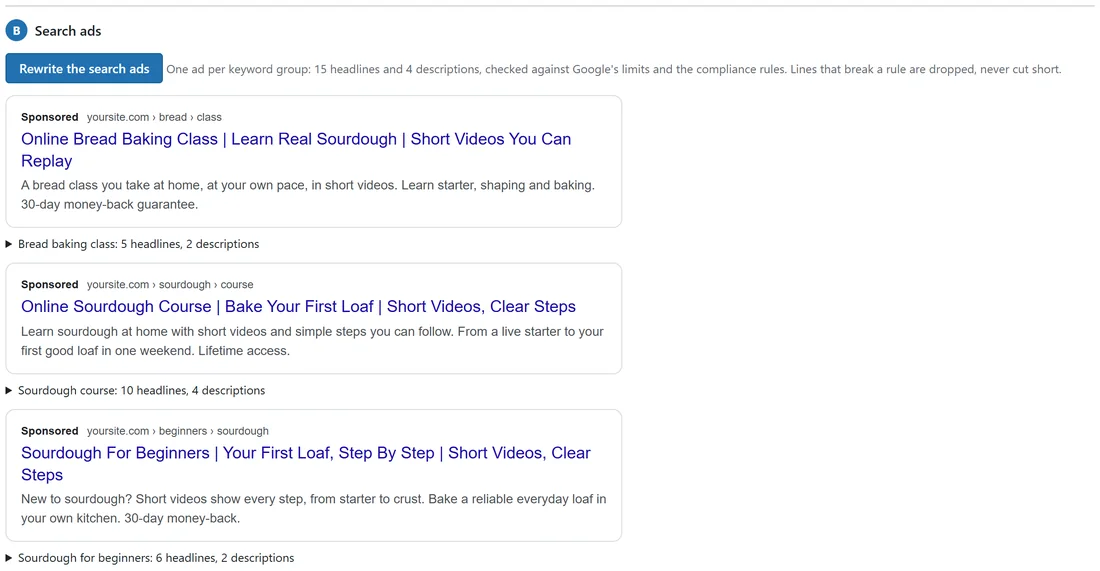
- Press Write the search ads (Rewrite the search ads once they exist).
- Each ad group gets 15 headlines (30 characters each), 4 descriptions (90 characters each) and two display paths, checked against Google's limits and the Compliance rules.
- Each ad shows a Google-style preview: Sponsored, your domain and paths, three headlines and two descriptions, with a line such as "Sourdough course: 10 headlines, 4 descriptions".
A line that breaks a rule or a limit is dropped, never cut short.
Editing a Search ad by hand:
- Open the line under the preview and Edit this ad.
- Change the headlines (one per line), descriptions and paths.
- Save. Lines over Google's limits show in red and are left out, never cut.
Each ad group's page:
Open the ad group in A. Keywords and type the address in Page for this ad group, then Save page. Empty means the campaign's page. Its ad, the preview and the Google Ads Editor download all use that page.
Creating the campaign:
- Check the settings in section C. See Google Search: Every Setting.
- Press Create in Google Ads (paused).
- ADs checks everything with Google first, then creates the budget, campaign, targeting, ad groups, keywords, negatives and ads in one go.
With the Google Ads script, the campaign is handed to the script and created on its next run; the screen says it is waiting. With the direct connection it happens at once.
If Google refuses part of it, you see which part ("the keyword ..." or "an ad") and Google's own words. If Google turns down a keyword under one of its ad policies, it does not hold up the rest: ADs leaves that keyword out, creates everything else, says which keywords and which Google policy, and unticks them in the campaign with Google's reason.
After it is created:

- The top of the section says where it stands, in Google's own words: In Google Ads, not switched on yet; Switched on, Google is reviewing the ads; Live in Google Ads; or Live in Google Ads, with limits. Open in Google Ads opens it.
- The Campaigns list shows the same, for example LIVE IN GOOGLE ADS.
- Your campaign in Google Ads now appears. See Managing Your Live Google Campaign.
- Section C becomes Settings, and updating Google Ads. See Updating A Campaign Already In Google Ads.
Every click carries its campaign, ad and keyword, so Results can show which keyword made which sale.
A real example:
On yoursite.com, the Bread baking class ad group's ad reads "Online Bread Baking Class | Learn Real Sourdough | Short Videos You Can Replay". The owner pressed Create in Google Ads (paused); the script created it on its next run, and after a check in Google Ads they switched it on there. The section now says Live in Google Ads. Your ads are showing.
Tips:
- Make sure auto-tagging is on in Google Ads, so every click carries the click id that ties a sale to its ad.
- Nothing spends until you switch the campaign on in Google Ads, or with Switch it on in ADs.
- For Gmail, YouTube and Display, see Gmail, YouTube, Discover And Display Campaigns.