API keys let another site you own read what WP Conversion Tracker AI knows about a customer. A membership site's admin screen is the typical use: open a member and see what they bought and which link brought them. The keys are read only, so nothing in your tracking, links or Dashboard can be changed through them.
What Another Site Can Ask:
Given a buyer's email address, the other site receives every conversion recorded for that email, with the product, amount, gateway, refund state and the link it came through, plus totals. Two addresses on your site answer:
- /wp-json/wct/v1/customer?email= followed by the address: the conversions for one email. An optional limit sets how many come back, up to 500. The default is 100.
- /wp-json/wct/v1/stats: overall stats.
The calling site sends its key in the X-WCT-Key header. With the Audience Vault add-on installed, a third address, /wp-json/wct-av/v1/profile?email=, returns that person's Vault profile with the same key, without private notes.
Where To Find It:
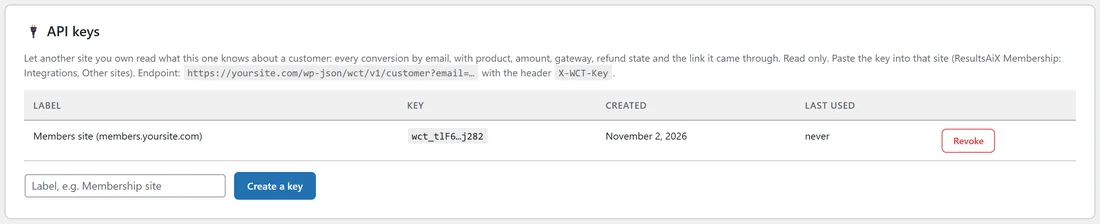
Click ⚙️ Settings, then ⚙️ Settings in the menu, and scroll to 🔌 API keys. The card shows the customer address for your site.
Creating A Key Step By Step:
- Type a label in the box, for example Members site (members.yoursite.com).
- Click Create a key.
- Copy the key straight away. It is shown once and stored in scrambled form, so it can never be shown again. If you lose it, create another.
- Paste it into the other site. In ResultsAiX Membership that is Integrations, then Other sites.
Managing Keys:
The card lists each key with its Label, a short Key hint, when it was Created and when it was Last Used. Click Revoke and any site using that key stops getting answers at once.
Limits:
Each IP address can make 120 requests a minute. A request with a missing or wrong key is refused.
A Real Example:
yoursite.com runs its members area on members.yoursite.com. The owner creates a key labelled Members site (members.yoursite.com) and pastes it into the members site. When a member writes in, their profile there shows every course and toolkit they bought, the amounts, any refunds, and the email or ad that first brought them.
Testing A Key:
A developer can test a key from a command line with a request such as:
curl -H "X-WCT-Key: your-key" "https://yoursite.com/wp-json/wct/v1/customer?email=buyer@example.com" A working key returns the buyer's conversions and totals. A wrong or revoked key is refused. The Last Used date on the card updates when a key is used.
Tips:
- Create one key per site, so you can revoke one without touching the others.
- The Last Used date tells you whether a key is still in use before you revoke it.