ClickBank and PayPal are both native integrations. The tracker recognises their notifications and reads every field it needs from them, so there are no tokens to build into the URL. Both cards are on 🔌 Connections, then 🎯 Tracking Setup, under 🔗 Platform-Specific Setup.
ClickBank Setup Step By Step:
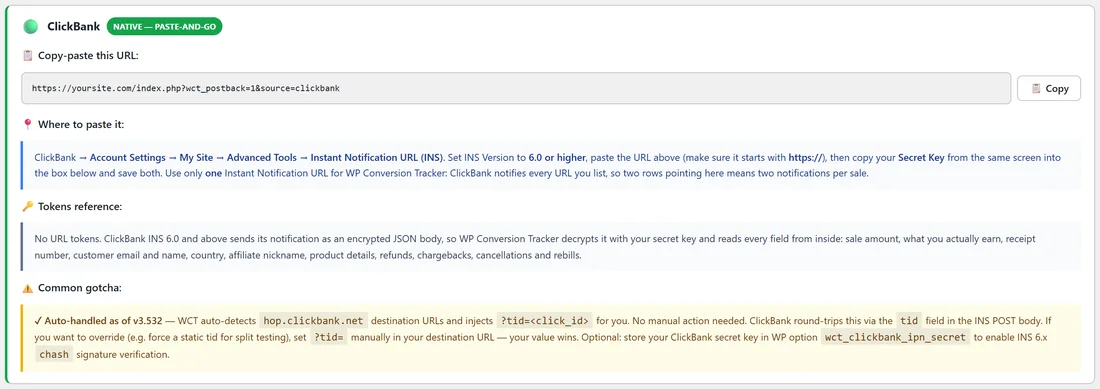
- Create a tracking link and paste your ClickBank hoplink straight into its Destination URL. When the destination is a ClickBank hoplink, the tracker adds ?tid= with the click ID for you, and ClickBank sends it back with the sale. If you ever want a fixed tid instead, add ?tid= to the destination yourself and your value is kept.
- In ClickBank, go to Account Settings, then My Site, then Advanced Tools, then Instant Notification URL (INS).
- Set INS Version to 6.0 or higher.
- Paste yoursite.com/index.php?wct_postback=1&source=clickbank, copied from the ClickBank card. Make sure it starts with https.
- Copy your Secret Key from the same ClickBank screen into the 🔑 ClickBank Secret Key box on Tracking Setup and click Save Key.
- Save in ClickBank and use its test button to check for a 200 response.
Why The Secret Key Is Needed:
From INS version 6.0, ClickBank sends every notification encrypted. The tracker uses your Secret Key to read it, so the key must match the one in your ClickBank account exactly. The key is stored on your site only and is never shown back on screen.
List The Tracker Once:
ClickBank notifies every URL you list, so two rows pointing at your site would send two notifications for every sale. List the tracker once. If you need a copy to reach another tool, use Forwarding A Copy Of Every IPN.
What ClickBank Sends:
Whether you sold the product or promoted it, the tracker records what you actually earn, with the full customer price kept alongside it. The buyer's name, email and country, the product, the receipt number and the affiliate nickname all come across, and a sale that carries a tid attaches to the click that produced it. ClickBank events are handled automatically: SALE, BILL for rebills, RFND for refunds, CGBK for chargebacks, INSF, which counts as a refund, and the rebill stop and restart events.
PayPal Setup Step By Step:
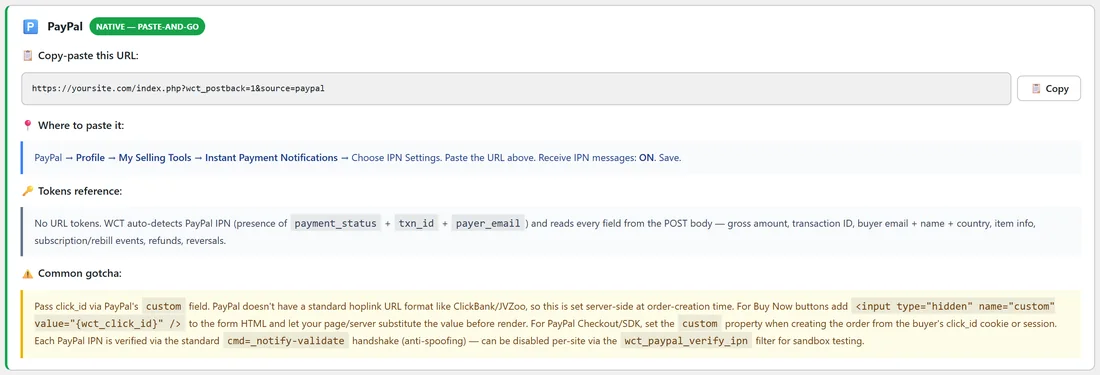
The tracker recognises PayPal IPN messages by their payment_status, txn_id and payer_email fields and reads everything from the message body.
- Pass the click ID through PayPal's custom field. For Buy Now and PayPal Standard buttons, add a hidden input named custom whose value is the visitor's click ID, filled in by your page or server. For PayPal Checkout and the SDK, set the custom property when you create the order.
- In PayPal, go to Profile, then My Selling Tools, then Instant Payment Notifications, then Choose IPN Settings.
- Paste yoursite.com/index.php?wct_postback=1&source=paypal, copied from the PayPal card.
- Set Receive IPN messages to on and save.
- After your next sale, check PayPal's IPN history and the Conversions tab.
What PayPal Sends:
- A Completed payment becomes a sale with the gross amount, buyer email, name and country, and item details.
- Subscription payments arrive with txn_type subscr_payment and are recorded as recurring sales.
- Pending payments are skipped on purpose, because PayPal sends a second Completed message once the payment clears.
Optional PayPal Verification:
By default the tracker accepts PayPal notifications without an extra round trip. A developer can switch on PayPal's own check with add_filter('wct_paypal_verify_ipn', '__return_true'); Each notification is then confirmed with PayPal, and one that PayPal does not confirm as VERIFIED is refused. It adds a second or two per notification, and sandbox notifications are checked against the sandbox.
A Real Example:
yoursite.com sells the Creator Coaching Club with a PayPal subscription button. The button's custom field carries the visitor's click ID, and PayPal's IPN setting points at the PayPal URL. Each month's payment arrives as a recurring sale on the coaching-club link, so the link's revenue grows with every renewal, and the Recurring column on Conversions shows which sales are renewals.
Testing ClickBank Step By Step:
- Save the Secret Key in the 🔑 ClickBank Secret Key box.
- Paste the URL in ClickBank and use ClickBank's test button. A 200 response shows the address is reachable.
- Click your tracking link in a private window and make a real or test purchase.
- Check 💰 Conversions for the sale with the right link, and the buyer's details filled in.
Tips:
- Use the 🔍 Troubleshooting checklist at the bottom of Tracking Setup if a sale does not appear.
- See Refunds, Chargebacks And Net Revenue for how ClickBank refunds and chargebacks change your totals.