You promote an affiliate offer to your email list and want everyone who buys to be tagged in your email app, so they get your bonus and stop receiving the promotion. WP Conversion Tracker AI, the Audience Vault add-on and WP Sync do this together, with nothing like Make or Zapier in the middle.
The idea is simple. The link in your email tells the tracker who clicked. The sale comes back to that click. WP Sync then tags that person in your email app.
What You Need:
- WP Conversion Tracker AI with the Audience Vault add-on.
- WP Sync with its Connect Pack, connected to your email app, for example Kit or AWeber.
- The sale reaching the tracker. For WarriorPlus, set up the affiliate side in W+ Connect. For JVZoo, use the Affiliate S2S Postback in JVZ Connect. See WarriorPlus Setup For Vendors And Affiliates and JVZoo Setup.
Step 1, The Link In Your Email:
Use your tracking link with the subscriber's email in it. Either way works:
- In the Sub-ID spot: yoursite.com/video-ads-kit/{subscriber email}
- As a parameter: yoursite.com/video-ads-kit?email={subscriber email}
Use your email app's own merge tag in place of {subscriber email}. Kit users can skip the merge tag: with Kit's Add subscriber_id parameter in email links setting on, the Audience Vault recognises the subscriber from Kit's ck_subscriber_id. See Audience Vault For Visitor Identity.
Step 2, The Link Settings:
On WarriorPlus links, leave 🔀 Forward Sub-ID to Destination URL set to Off in ⚙️ Advanced Options. The tracker already passes its own click ID to WarriorPlus, and that is how the sale comes back to the right click.
Step 3, The Sync:
In WP Sync, create a sync with WP Conversion Tracker as the source and Attached links, on Sale or Lead as the list. Add your email app as the destination with the action Add tag, and type the tag, for example bought-video-ads-kit. If you put a tag word in the link's Sub-ID instead of an email, you can use {sub_id} as the tag name.
Step 4, Attach The Sync To The Link:
Open the link in the tracker with ✏️ Edit and tick that sync in the Send to WP Sync box, then click Update Link. The box appears on the link form once WP Sync is installed.
What Happens Next:
- A subscriber clicks the link in your email.
- The tracker records the click with who they are and sends them to the offer, carrying its click ID.
- They buy. The sale comes back to that click.
- WP Sync finds the person and adds the tag in your email app.
A repeated sale notification for the same sale never tags the person twice.
Checking It Worked:
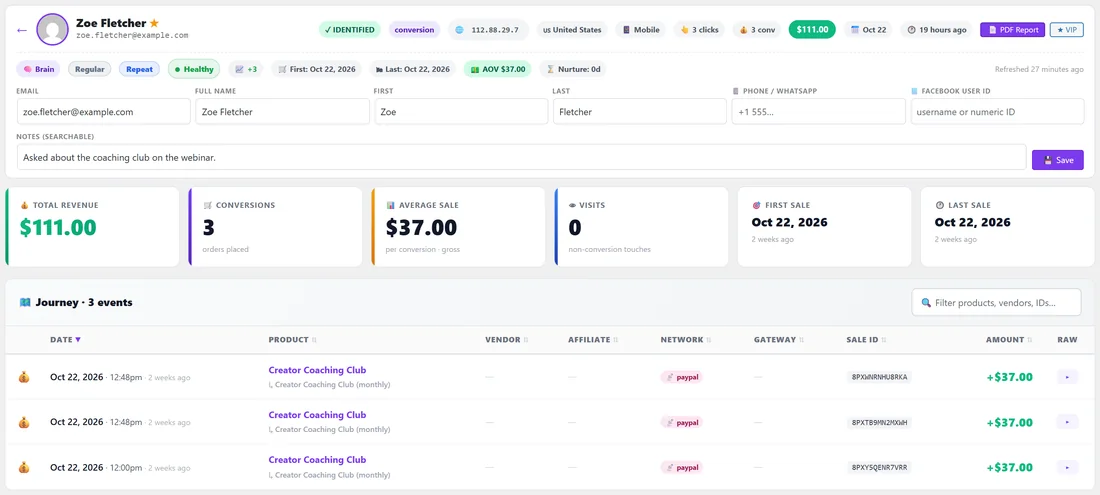
- The sale shows on 💰 Conversions with the buyer's email.
- The person shows in 👤 Audience Vault with the sale in their journey.
- WP Sync's Activity Log says what happened at each step for that sale.
The affiliate network's own stats only ever show the tracker's click ID, never your subscribers' emails.
A Real Example:
yoursite.com promotes the Video Ads Kit, a JVZoo product, in the Tuesday newsletter. The button uses yoursite.com/video-ads-kit/{subscriber email}. A WP Sync sync adds the tag bought-video-ads-kit in the email app. When a reader such as maya.keller@example.com buys, the sale arrives through the JVZoo Affiliate S2S Postback, the tracker joins it to her click, and she is tagged within moments. The owner's next promotion simply excludes that tag.
Tag Ideas That Keep Your List Tidy:
- bought-offer-name for every buyer of a promotion, so you can send your bonus and stop the promotion for them.
- clicked-offer-name for everyone who clicked, if you want to follow up with people who looked but did not buy.
- A Sub-ID tag such as {sub_id} when you share one link in several places and want the tag to say where the buyer came from.
Use the same pattern for every promotion so the tags sort together in your email app.
Tips:
- Emails used as Sub-IDs are grouped into one Email subscribers row in the Sub ID Breakdown, so your real sources stay readable. See Sub-ID Tracking For Traffic Sources.
- Use the same tag pattern for every promotion, such as bought-offer-name, so your email app stays tidy.
- Exclude buyers from the rest of the promotion in your email app, so they only hear about your bonus.