If you email your list often, you may see one old link collecting sales it did not earn. A buyer clicked a lead magnet link months ago, the marketplace still remembers that click, and today's promotion gets no credit. Smart IPN Re-attribution fixes this at the moment the sale arrives.
What It Does:
When a sale notification arrives, the tracker also looks at the buyer's recent click history, matched by email, by IP address and browser, or by IP address alone, depending on the strictness you choose. If that person clicked a more recent tracking link than the one the payment platform reported, the sale is credited to the recent click instead.
Where To Find It:
Click ⚙️ Settings, then ⚙️ Settings in the menu. The 🎯 Smart IPN Re-attribution (for daily-promo mailers) section is inside ⚙️ General Settings.
The Settings:
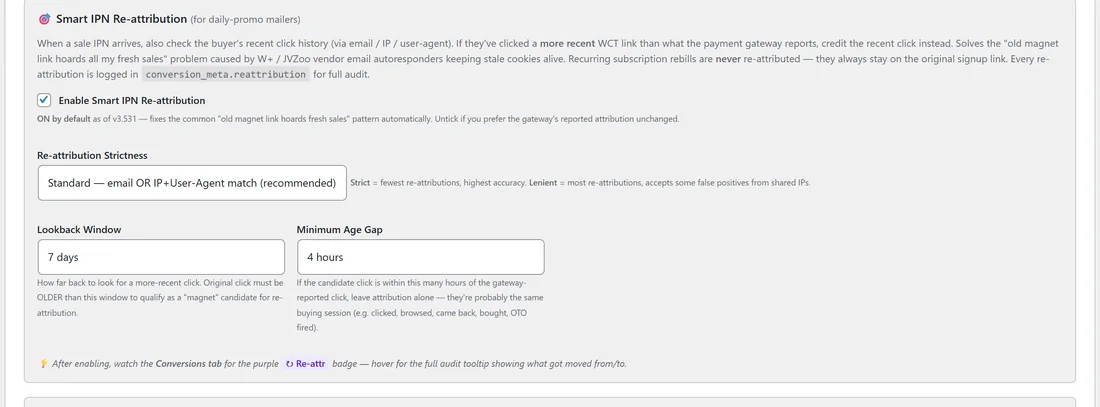
- Enable Smart IPN Re-attribution: on by default, because the old link problem is so common. Untick it to keep exactly the click the payment platform reports.
- Re-attribution Strictness: Strict, only on an email match, the highest confidence. Standard, an email match or an IP plus browser match, the recommended setting. Lenient, email, IP plus browser, or IP alone, the widest coverage, with the odd false match from shared IP addresses.
- Lookback Window: 1, 3, 7, 14 or 30 days. How far back to look for a more recent click. The click the platform reported must be older than this window before it counts as an old link.
- Minimum Age Gap: 0, 1, 4, 12, 24 or 72 hours. If the newer click is within this many hours of the reported click, nothing changes, because the two are almost certainly the same buying visit, such as a buyer who clicked, browsed and came back, or an upsell minutes later.
Click 💾 Save General Settings when you are done.
What Is Never Moved:
Subscription rebills always stay with the link that made the original sale, so your recurring revenue stays on one link.
Checking What It Changed:
Every move is written into the conversion's details. On 💰 Conversions, a moved sale carries a purple ↻ Re-attr badge. Hover it to see the full audit: where the credit came from and where it went.
Tuning It Step By Step:
- Start with Standard and the default window and gap.
- After a week of promotions, filter 💰 Conversions to Sales Only and look for the ↻ Re-attr badges.
- If credit moves in ways you do not agree with, switch to Strict or raise the Minimum Age Gap.
- If old links still collect fresh sales, widen the Lookback Window or try Lenient, then check the badges again.
A Real Example:
A subscriber of yoursite.com opted in through the starter guide link in August. In October they click the Traffic Toolkit link in a promotion email and buy, but WarriorPlus reports the old August click. With Standard strictness, the tracker sees the newer click from the same email address, credits the Traffic Toolkit email, and the sale on Conversions shows the purple ↻ Re-attr badge with the move explained.
How The Settings Work Together:
Picture a buyer who clicked the starter guide link 40 days ago and the Traffic Toolkit email link 2 hours before buying, while the platform reports the old click:
- The Lookback Window is 7 days, and the old click is older than that, so it counts as an old link.
- The newer click is 38 days later, far more than the Minimum Age Gap of 4 hours, so the two are separate visits.
- With Standard strictness, the newer click matches by email, so the sale moves to the Traffic Toolkit email link.
Had the newer click been 20 minutes after the reported one, the age gap would have left the sale alone.
Tips:
- Navigation-only links never take credit, so in-funnel buttons are not candidates. See Attribution Models And Navigation-Only Links.
- Re-attribution works on what the tracker knows about the buyer, so the Audience Vault's identity data helps it find more matches. See Audience Vault For Visitor Identity.