When someone is in the middle of an automation, a broadcast on top of it can be too much email, or can say something that clashes with what the automation is about to tell them. The In an automation filter lets you decide, broadcast by broadcast or for good.
Adding the filter:
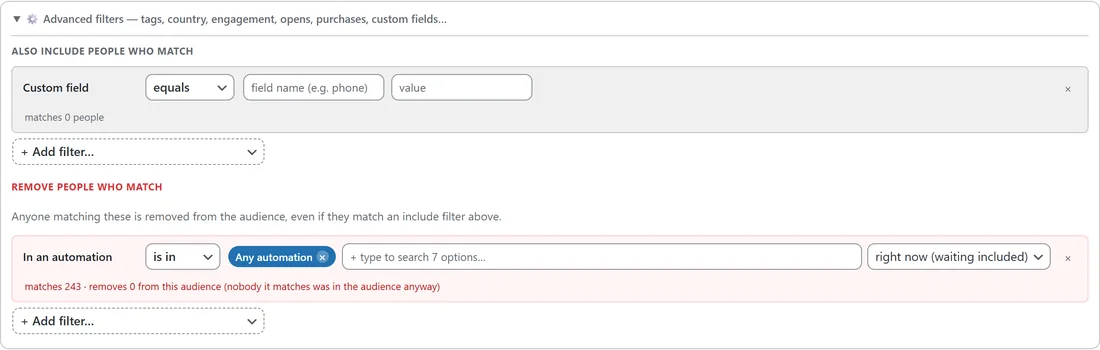
- In the audience builder, open ⚙️ Advanced filters.
- Under Also include people who match or Remove people who match, press + Add filter and choose In an automation.
- Choose is in or is not in.
- Leave Any automation, or type to pick the automations you mean.
- Choose what counts.
Choosing what counts:

- right now (waiting included): the default. People currently moving through the automation, including anyone sitting on a wait step.
- at any time: anyone who has ever entered it.
- and finished it: people who reached the end.
- entered in the last: anyone who joined it in the last number of days you type, whatever happened next.
The row shows how many people match, and under Remove people who match it also says how many it takes out of this audience.
Examples:
- Leave out anyone in any automation right now, so a promotion never lands in the middle of someone's welcome series. Put In an automation, is in, Any automation, right now under Remove people who match.
- Send the next offer only to people who finished your onboarding automation: In an automation, is in, your onboarding automation, and finished it.
- Remind people who entered your launch automation in the last 7 days: is in, the launch automation, entered in the last, 7 days.
Where it works:
- The broadcast audience builder, its live count, and the send itself.
- Saved segments. See Segments And The AI Segment Builder.
- Always leave out rules in Setup, then Settings, so it applies to every broadcast. See Always Leave People Out Of Broadcasts.
- The AI audience box, so you can write everyone except people in an automation right now.
A real example:
Leafwise Gardening sends a weekly tips broadcast. Anna does not want new readers to get it while they are still in the Newsletter welcome series, so she added an Always leave out rule: In an automation, is in, Newsletter welcome series, right now (waiting included). New readers now finish the welcome series first and get the weekly tips after that.
Tips:
- To see which automations one person is in, open their profile. See Seeing Which Automations Someone Is In.
- See Building A Custom Audience for every other filter.