An automation does not have to start on a single event. You can give it up to ten start triggers, each with its own settings, and any one of them puts the person at step one. That keeps one welcome series for everyone, wherever they signed up.
Where to find it:
Emails, then Automations, open an automation. In the panel 🎯 Start this automation when…, click + Add another start trigger.
Adding a second trigger:
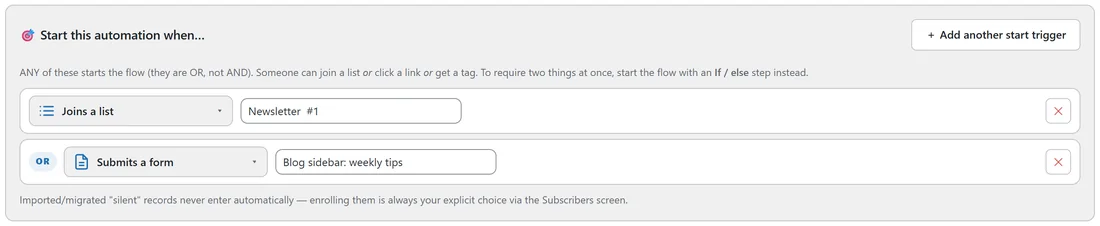
- Click + Add another start trigger. The picker "What starts this automation?" opens.
- Choose the event, for example Submits a form.
- Set its detail in the row, for example the form Blog sidebar: weekly tips.
- Repeat for more triggers. Each new row is marked OR.
- To remove a row, click its ✕. One trigger always stays.
- Press 💾 Save automation.
The list, form, tag and product pickers are searchable, so a site with thousands of lists is no problem: start typing the name.
Why it is OR, not AND:
Triggers are events, and two events happen at different moments. Nobody joins a list and clicks a link in the same instant, so the panel says it plainly: ANY of these starts the flow. The person still enters only once; a second trigger firing for someone already inside does nothing.
When you need two things at once:
That is a condition, not a trigger. Start the automation on the event, then make the first step an If / else that checks the other thing. For example, to pitch the Garden Planner Pro to new newsletter subscribers who are not customers yet:
- Trigger: Joins a list: Newsletter.
- First step: If / else, "has the tag…" customer.
- YES: 🏁 End here.
- NO: the promo emails.
The AI Helper builds exclusions like this into the flow for you. See The AI Helper: Ask It, Or Tell It To Build.
A real example:
The "Newsletter welcome series" on Leafwise Gardening has two triggers: Joins a list: Newsletter OR Submits a form: Blog sidebar: weekly tips. People who join from the homepage and people who sign up in the blog sidebar get the same five emails, and the Automations list shows the trigger as "Joins a list: Newsletter OR Submits a form: Blog sidebar: weekly tips".
Tips:
- Every trigger and its settings are listed in Automation Triggers Explained.
- To stop people when a second event happens later, use an exit rule. See Taking People Out Of An Automation.