Unsubscribes, bounces and spam complaints are the three numbers inbox providers watch most closely. Keep them low and your email lands in the inbox; let them climb and it starts landing in spam.
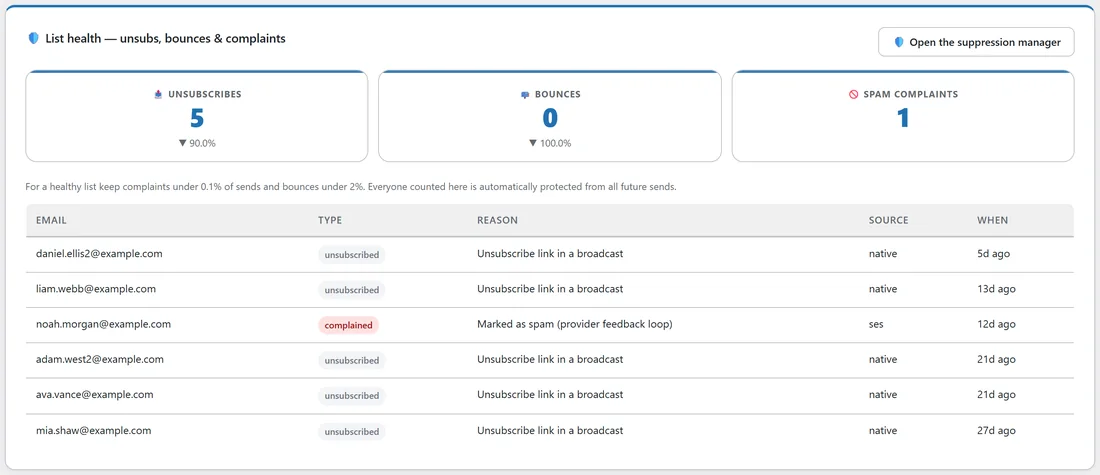
The List health panel on Reports shows all three for any date range, compared with the period before, and lists the latest people behind them.
Where to find it:
Click Reports in the blue menu bar and scroll to List health. The panel uses the date range chosen at the top of Reports.
Reading the panel:
- Pick a range at the top of Reports, for example 30 days.
- The three tiles show Unsubscribes, Bounces and Spam complaints in that range.
- Under each number, the arrow compares it with the period before. A fall shows green and a rise shows red, because fewer is better here.
- Under the tiles, a table lists the latest people added in the range with their Type, the Reason, the Source and When.
The Source tells you who reported it: native for your own unsubscribe link, or the sending service that reported a bounce or complaint, such as ses for Amazon SES.
The benchmarks:
- Complaints: keep them under 0.1% of what you send.
- Bounces: keep them under 2% of what you send.
- Unsubscribes: some are normal and healthy. Watch for a jump after one particular email.
Stay past those levels for long and inbox providers start filtering your email to spam.
Everyone counted here is protected:
Every person in this panel is on your suppression list and is skipped by all future sends. Bounces follow a careful rule: a hard bounce is blocked straight away, and a soft bounce only counts once it has happened 5 times within 90 days. See Hard And Soft Bounces.
To browse, search, add or set free any of these addresses, click Open the suppression manager. See The Suppression List.
Reading the headline numbers:
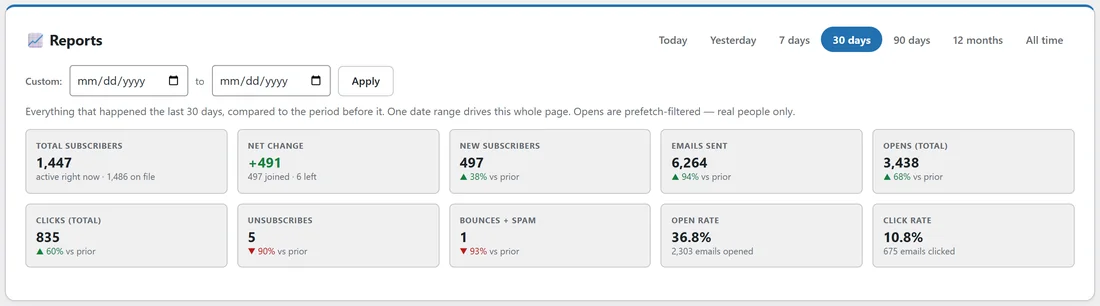
The top of Reports shows the same story in the Unsubscribes and Bounces + spam tiles, next to Total subscribers, Net change, New subscribers and Emails sent. Net change is joined minus everyone who left, so you can see at a glance whether the list is growing.
Getting bounces and complaints reported:
Your sending service reports bounces and complaints through its webhook. On Delivery, then Sending, the Bounce and complaint webhook card gives you the address to copy into your sending service, with the bounce, spam complaint and unsubscribe events turned on.
Moving from another autoresponder:
Import your old unsubscribe file on Delivery, then Deliverability, before you import your subscribers. People who left years ago then stay protected from day one.
A real example:
Anna checks Reports for Leafwise Gardening over 30 days. List health shows 5 unsubscribes, down 90% on the month before, 0 bounces, and 1 spam complaint. The table shows the complaint came from Amazon SES with the reason Marked as spam. With about 6,000 emails sent, one complaint is well under 0.1%, so she is comfortable. The unsubscribes all came from the unsubscribe link in a broadcast.
Tips:
- Look at List health after every big send.
- If complaints rise, check the email that went out just before, and who it went to.
- If bounces rise after an import, the imported list was probably old. Clean it before mailing it again. See The Audience Health Check.
- Keep a clear unsubscribe link in every email. People who cannot find it click spam instead.