A brand new sending account, server or domain has no reputation yet. Send 20,000 emails through it on day one and inbox providers treat it with suspicion. Warmup sets a small cap for the first day and raises it every day, and the queue does the rest: emails beyond today's cap simply wait for tomorrow.
Warmup is set per connection, so a new account can warm up while your established connections carry on as normal.
Where to find it:
Open Delivery, then Sending, and scroll to the Send Rotation & Warmup card. Each connection in the table has a Warmup column with a Warm up tick box. It works in every mode, including Priority + failover.
Switching it on, step by step:
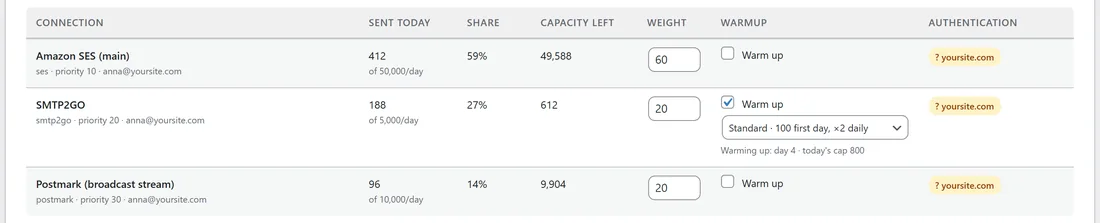
- Open Delivery, then Sending, and scroll to Send Rotation & Warmup.
- Tick Warm up on the connection's row. A pace dropdown appears under it.
- Choose a pace (below).
- Click Save rotation & warmup.
- The row now shows where the ramp is, for example "Warming up: day 4 · today's cap 800".
Day 1 is the day you save it switched on. Saving other settings later never restarts a ramp in progress. Unticking Warm up and saving stops it; ticking it again later starts again from day 1.
The four paces:
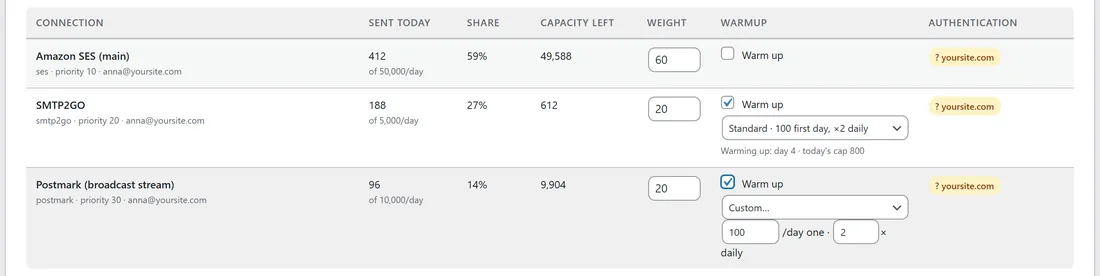
- Conservative: 50 on the first day, times 1.5 each day (50, 75, 113, 169 and so on). For a brand new domain or a list you have not mailed in a long time.
- Standard: 100 on the first day, doubling each day (100, 200, 400, 800). The starting choice, right for most new accounts.
- Fast: 500 on the first day, doubling each day (500, 1,000, 2,000, 4,000). For an account with some history behind it.
- Custom: your own first day cap (from 1 to 100,000) and daily growth (from 1 to 10 times, in steps of 0.1). Two small boxes appear when you choose Custom.
How the cap and the queue work together:
- Today's cap is the first day cap multiplied by the growth for each day since you started, rounded up.
- The cap never goes above the connection's Daily limit. When the ramp reaches it, the row says "Warmup complete" with the day number, and the Daily limit takes over from then on.
- With no Daily limit set, the cap keeps growing every day.
- When every real connection has used today's capacity, the rest of the queue waits and is tried again every 10 minutes until capacity returns, usually the next day. Nothing is failed, nothing is lost, and nothing goes out through wp_mail.
- Capacity left in the table shows how much room the connection has today.
A 20,000 email send on Standard:
Queue the broadcast to everyone today, as normal. Day by day it goes 100, 200, 400, 800, 1,600, 3,200, 6,400 and 12,800, so the whole send is complete on day 8, without you touching anything.
With rotation:
Warmup and rotation work well together. A warming connection takes its share until it reaches today's cap, then drops out of the rotation for the rest of the day while your established connections carry on. See SMTP Rotation: Spread Sends Across Many Connections.
A real example:
Leafwise Gardening added SMTP2GO on 30 October with a Daily limit of 5,000, and Anna ticked Warm up with the Standard pace. On 2 November the row says "Warming up: day 4 · today's cap 800". It has sent 188 today, so its Capacity left is 612. Its cap doubles to 1,600 tomorrow and 3,200 the day after, and on day 7 it reaches the 5,000 Daily limit and the row says Warmup complete. Meanwhile Amazon SES and Postmark carry the rest of each newsletter.
Tips:
- Warm up every brand new account, even with a great list. Providers watch new accounts closely.
- Mail your most engaged readers first while warming up. A segment of recent openers is ideal (see Segments And The AI Segment Builder).
- Set a Daily limit on the connection, so the ramp knows where to stop.
- If your server is already warm and you only want a ceiling, set Daily limit instead of warmup. The queue waits in the same way when it is reached.
- To spread one broadcast over days on purpose, see also Sending A Broadcast In Waves.
If something does not look right:
- If the pace dropdown does not appear, tick Warm up on that row first.
- If the row shows no "Warming up" line after you tick Warm up, click Save rotation & warmup. The ramp starts when it is saved.
- If a broadcast seems slow, check Capacity left on each row. Waiting emails are normal during warmup and go out as each day's cap opens.
- If the ramp restarted at day 1, Warm up was unticked and saved at some point. Choose Fast or Custom with a higher first day cap to catch up.