Twelve choices on one screen can feel like a lot when you just want to send. The good news: there is no single best provider, only the right one for where you are now, and you can change at any time without losing a subscriber or a single report.
This article walks through the guide that is built into the Sending screen, so you can decide in a few minutes.
Where to find it:

Open Delivery, then Sending. Under the Sending Providers heading there are two panels you can open with a click:
- "Not sure which one to pick? Read this first." This is the situation table below. It opens by itself while you have no connections yet.
- "Read before you import or send." These are the rules that keep a sending account in good standing.
When you choose a provider in the + Add Sender form, a short note for that provider appears too, with Best for, Setup and Watch out lines.
Pick by situation:
- I just want to test the plugin: WordPress wp_mail. No setup at all, and fine for sending yourself a test. Switch before you mail anyone real.
- Small list, under a few thousand, and I want easy: Resend, Brevo or SMTP2GO. All three are simple to set up, and you can be sending properly in about ten minutes.
- Real list, and I care most about cost: Amazon SES. It is the best value once you send real volume. Setup takes longest, and you must request production access to leave the sandbox.
- Real list, and arriving in the inbox matters most: Postmark. It has the strongest reputation of the group, and it expects a clean list.
- A big list I mail every day (10,000 or more): Amazon SES, with a second provider kept as backup at a higher priority number, and warmup switched on for SES at the start.
- I already pay for a mail service: Bring-your-own SMTP. If a service gives you an SMTP host, port, username and password, paste those in and keep using the account you have.
Still undecided? The panel's own advice is to pick Resend or SMTP2GO. Both are quick to set up and easy to move away from later.
Each provider in one line:
- Amazon SES: best value at volume. Verify your domain, then request production access.
- Postmark: best inbox placement. Strict about list quality and keeps bulk mail apart from transactional mail.
- SendGrid: a well known all rounder. New accounts can be reviewed.
- Mailgun: developer friendly with detailed logs. Pick the right region, US or EU.
- Resend: the simplest modern setup. Create a key, verify a domain, done.
- SparkPost: for high volume senders who want detailed analytics. Has a separate EU service.
- Mailjet: popular with European senders. Needs an API key and a secret key.
- Brevo: friendly for small lists starting out. Plans count sends per day.
- Elastic Email: chosen when budget decides. Your own domain authentication matters most here.
- SMTP2GO: reliable, well supported, a safe middle ground.
- Bring-your-own SMTP: keep a mail service you already pay for. Not for personal mailboxes such as Gmail or Outlook.
- WordPress wp_mail: tests and a handful of site emails only.
If your data must stay in Europe:
Mailgun has an EU region and SparkPost has an EU endpoint, and both are a setting on the connection form. Mailjet and Brevo are European companies.
Rules that keep any account in good standing:
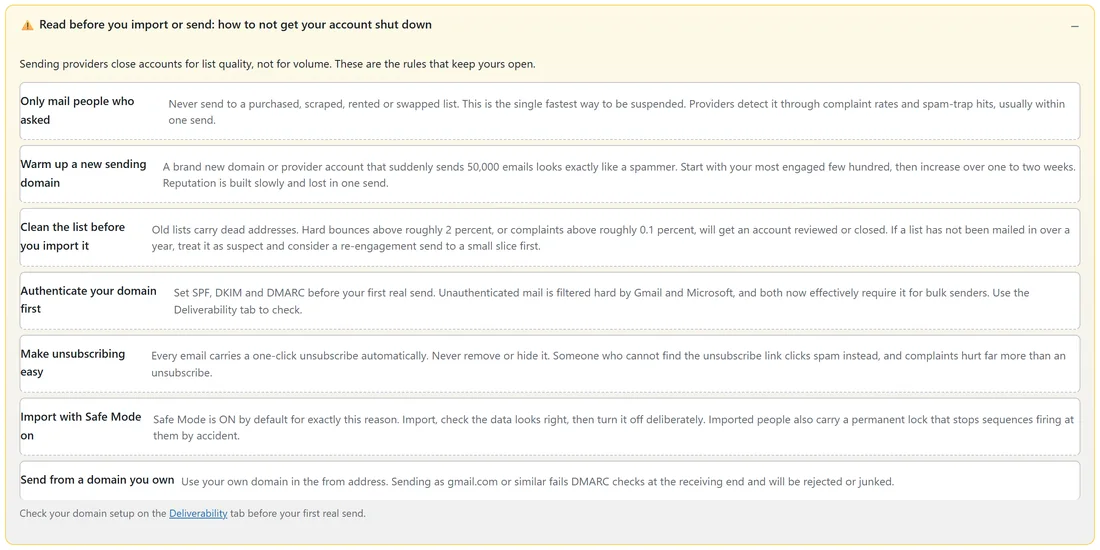
The "Read before you import or send" panel lists seven habits. Sending services review accounts for list quality, not for volume, so these matter more than which logo you choose.
- Only mail people who asked. Never send to a bought, scraped, rented or swapped list.
- Warm up a new sending domain. Start with your most engaged few hundred people and increase over one to two weeks.
- Clean the list before you import it. Hard bounces above roughly 2 percent, or complaints above roughly 0.1 percent, get an account reviewed. If a list has not been mailed in over a year, start with a small slice.
- Authenticate your domain first. Set SPF, DKIM and DMARC before your first real send, and check them on the Deliverability tab.
- Make unsubscribing easy. Every email carries a one-click unsubscribe automatically, so leave it in place.
- Import with Safe Mode on. Import, check the data looks right, then turn Safe Mode off when you are ready.
- Send from a domain you own, not a free mailbox address.
You can change your mind later:
A connection is only saved settings. You can add a second one at any time, keep both, and share sends between them with rotation. Your subscribers, history and reports stay exactly where they are. Many people start on an easy provider and add Amazon SES once their volume makes the extra setup worthwhile.
A real example:
Leafwise Gardening started with SMTP2GO when the newsletter had a few hundred readers, because it was set up in an afternoon. As the list grew past ten thousand, Anna added Amazon SES as the main connection at priority 10 and kept SMTP2GO at priority 20 as backup. Later she added Postmark for the readers who matter most and switched the Sending screen to Weighted shares, so SES carries most of the volume and the other two keep their reputation warm.
Tips:
- Choose for the next six months, not forever. Moving later is a five minute job.
- Whatever you pick, authenticate your domain first. See Deliverability: SPF, DKIM And DMARC.
- Clean an old list with Verify Leads before its first send through a new provider.
- Connect a second provider early as automatic backup. See Setting Up Sending With SMTP.
- When you outgrow one account, add another and turn on rotation. See SMTP Rotation: Spread Sends Across Many Connections.
- For the step by step setup of each service, open its own Connect article, for example Connect SMTP2GO or Connect Amazon SES.