The trigger is the front door of an automation: the event that puts a person at step one. ResultsAiX Mailer has fifteen triggers, grouped by what they listen to. An automation can have several, and any one of them starts it (see Multiple Start Triggers).
Where to find it:
Emails, then Automations, open an automation (or ➕ New automation (blank)). The panel 🎯 Start this automation when… holds the triggers. Click a trigger to change it, or + Add another start trigger to add one. Both open the picker "What starts this automation?".
The trigger picker:
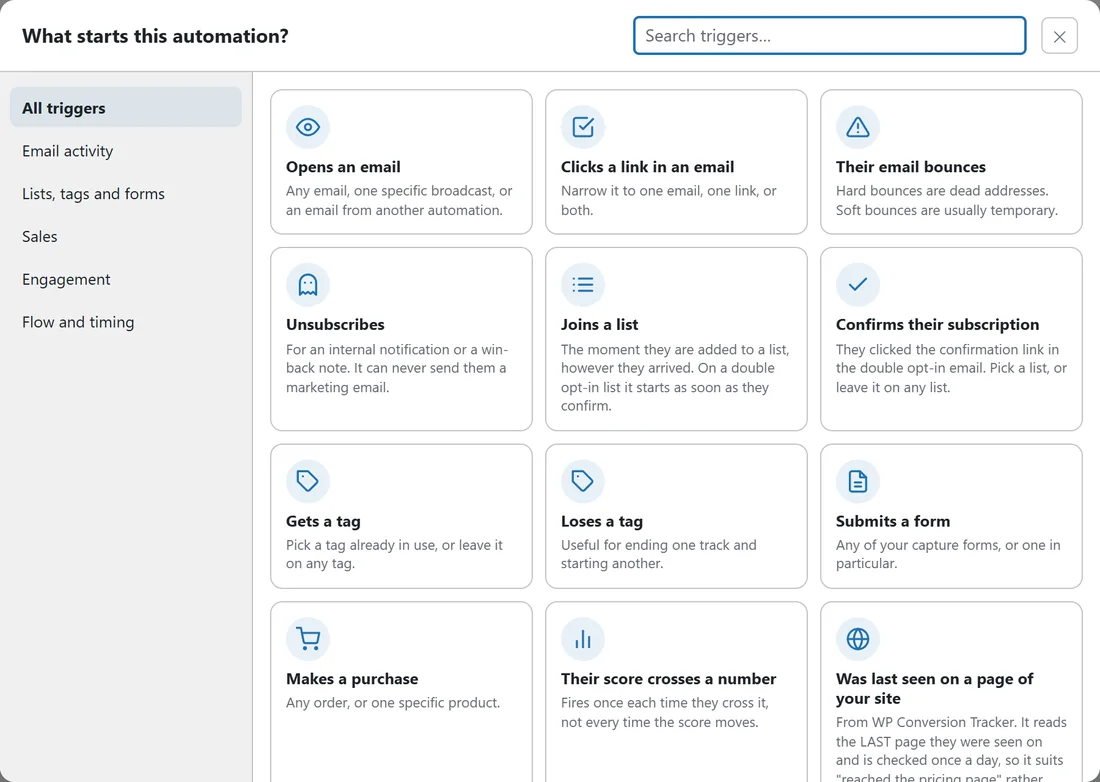
The picker has a search box and a list of groups on the left: All triggers, Email activity, Lists, tags and forms, Sales, Engagement, and Flow and timing. Click a tile to choose it. A trigger that needs another product is shown locked with the reason, never hidden.
Email activity:
- Opens an email: any email, one broadcast, or an email from another automation. Only broadcasts that were sent, are sending or are scheduled can be picked. Opens from inbox scanners are filtered out.
- Clicks a link in an email: narrow it to one email, one link, or both. The link can be picked from links people have already clicked, or typed as "URL contains" text for a link nobody has clicked yet.
- Their email bounces: any bounce, hard bounces only (dead address), or soft bounces only (usually temporary).
- Unsubscribes: for an internal notification or a win-back note. It can never send them a marketing email; only steps such as Notify me, tags or a webhook do anything for them.
Lists, tags and forms:
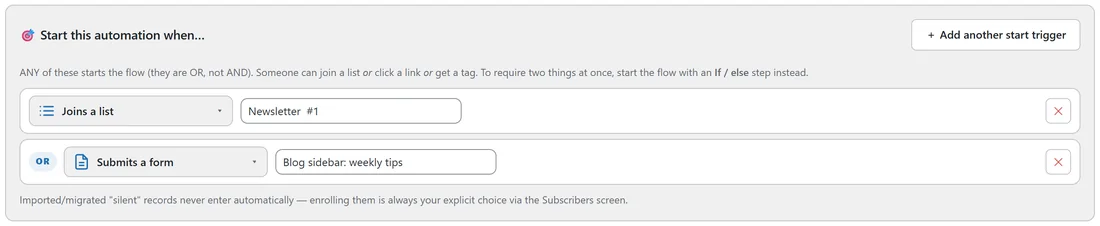
- Joins a list: the moment someone is added to a list, however they arrived. On a double opt-in list, the person waits at the door until they confirm, for up to 30 days. Pick a list, or leave it on any list.
- Confirms their subscription: they clicked the confirmation link. Pick a list, or leave it on any list.
- Gets a tag: pick a tag already in use, or leave it on any tag.
- Loses a tag: useful for ending one track and starting another.
- Submits a form: any of your forms, or one in particular.
Sales:
- Makes a purchase: any order, or one specific product. Needs a sales source: Launch Manager, or Commerce connected on Setup, then Integrations.
Engagement:
- Their score crosses a number: reaches, or falls below, the number you set. It fires once each time they cross it, not every time the score moves.
- Was last seen on a page of your site: from WP Conversion Tracker. Type part of the page address. It reads the last page each person was seen on in the last two days and is checked once a day, so it suits "reached the pricing page" rather than instant reactions.
Flow and timing:
- Finishes another automation: when one flow ends, the next begins. An automation can never be started by its own finish.
- A number of days after they joined: checked once a day. Day 0 is the day they were added. Only people whose day comes up today enter, so saving it never sweeps your whole back catalogue in at once.
- Manually enrolled only: nothing starts it. You enroll people yourself.
Who is allowed in:
- Only an Active automation lets people in. Draft and Paused automations ignore their triggers.
- Each person enters once. Tick Allow re-entry after finishing to let finished people go through again; someone already inside is never entered twice.
- Imported or migrated contacts that arrived under the silent import lock never enter by themselves. Enrolling them is always your own choice, from the Subscribers screen.
- A trigger needs a real event: "Joins a list" only fires when a list is involved, so a buyer record created without a list does not land in every welcome flow.
Steps that start other automations:
When an automation step adds a tag, removes a tag, or adds someone to a list, any other active automation whose trigger names exactly that tag or list starts for them, on the next minute. Triggers left on "any tag" or "any list" are not woken by another flow's steps, and the automation running the step is never restarted by it, so flows can hand people on without looping.
Enrolling people by hand:
Go to Audience, then Subscribers. Tick people, or use Select All Matching with a filter, then choose ⚡ Enroll in automation… and pick the automation. This is how you run people who joined before the automation existed, and how a Manually enrolled only flow gets its people.
A real example:
Leafwise Gardening uses four different doors.
- Newsletter welcome series: Joins a list: Newsletter OR Submits a form: Blog sidebar: weekly tips.
- Tomato page: clicked but did not buy: Clicks a link in an email, with a link containing yoursite.com/tomato-masterclass/.
- Raised Bed Masterclass onboarding: Makes a purchase, product Raised Bed Masterclass.
- Webinar: confirm and remind: Gets a tag: webinar-registered.
Tips:
- To require two things at once, start on one event and check the other with an If / else as the first step. See Multiple Start Triggers.
- To stop people when something happens part way through, use an exit rule. See Taking People Out Of An Automation.
- Behaviour Tagging on broadcasts can add tags that start automations. See Behavior Tagging: Tag People By What They Do.