Each funnel needs its own files on your server: the opt-in page, the download page, the PDF, the cover image and the legal pages. The Assets tab downloads them all in one go. It is a large download, so a slow or strict host can stop it part way. Here is how to get every file in place.
Where to find it:

Go to Free List Building and click the Assets tab. Overall Status shows how many funnels are installed, for example 96 / 96 Funnels Installed, and Category Breakdown shows each category.
Step by step:
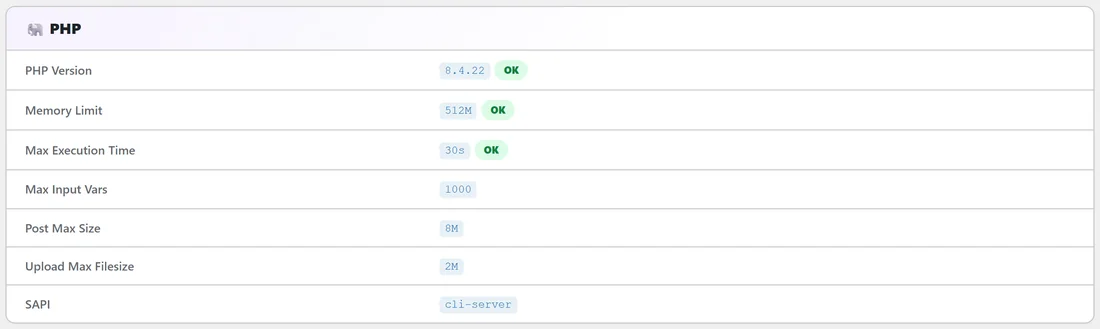
- Click the Diagnostics tab and look at the PHP section. Max Execution Time should be 60 seconds or more; a shorter value shows "Recommend 60s+ for asset downloads". Memory Limit should be 128M or more.
- If either is low, ask your host to raise max_execution_time and memory_limit. Most hosts do this in minutes.
- Go back to the Assets tab and click Download All Funnel Assets. The button changes to Downloading... while it works. Leave the page open until it finishes.
- If an error message appears, copy it. It comes from your server and tells your host what to look at.
- Check Overall Status again. It should now show all funnels installed.
If the download keeps stopping:
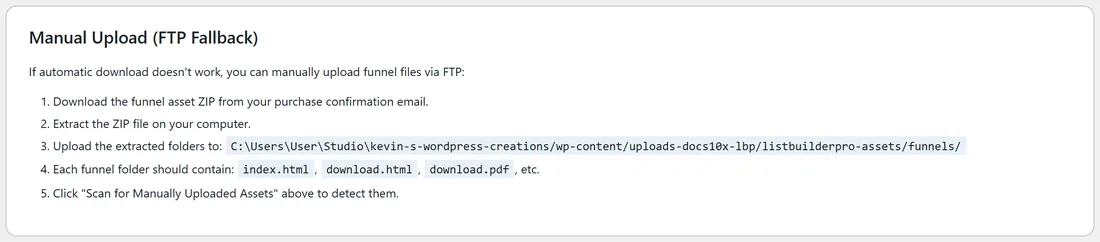
Upload the files yourself.
- Download the funnel asset zip from your purchase confirmation email and unzip it on your computer.
- Using FTP or your host's file manager, upload the funnel folders into wp-content/uploads/listbuilderpro-assets/funnels/ (the Manual Upload (FTP Fallback) box on the Assets tab shows the exact folder for your site).
- Each funnel folder should contain index.html, download.html and download.pdf, plus its images and legal pages.
- Click Scan for Manually Uploaded Assets. A message such as "96 of 96 funnel assets found." confirms it.
If Diagnostics shows uploads/listbuilderpro-assets/ as missing or not writable:
WordPress cannot write to your uploads folder. Ask your host to make wp-content/uploads writable, then try again.
A real example:
On a small shared plan, Your Site's download stopped after a minute. Diagnostics showed Max Execution Time 30s. Sam asked the host to raise it, clicked Download All Funnel Assets again and all 96 funnels installed.
Tips:
- A funnel counts as installed when both its opt-in page and its PDF are in place.
- See Downloading Funnel Assets, What's Included in Each Funnel Folder and Manual Upload via FTP for more detail.