These tips come from building custom funnels day to day. They help your funnels go live quickly and keep working as your list grows.
Before you build:
- Add your categories on the Categories screen first, or use + Create New Category in step 1 of the wizard. Every funnel then has a home on the Showcase page.
- Set a Default Affiliate Link in Settings so every custom funnel's download page shows your Check Out This Resource button, even when you leave the wizard's Affiliate Link blank.
- Upload your PDFs and covers to the WordPress Media Library. Your site can always reach its own files.
While you build:
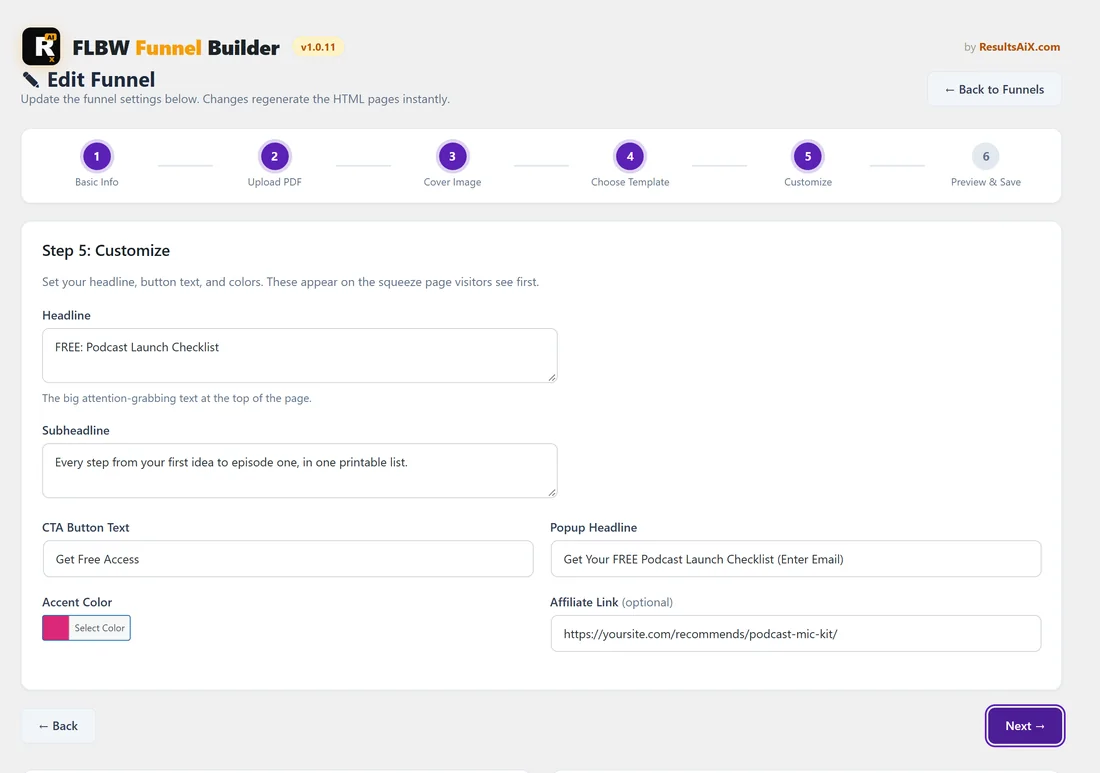
- Choose the web address with care in the URL Slug box. It stays the same when you edit the funnel later, so short and clear works best, for example podcast-launch-checklist.
- For the PDF, the easiest route is Upload PDF. If you use a link, open it in a private browser window first. It should show or download the PDF straight away, with no sign-in or share page.
- Keep the headline short enough to read in one glance on a phone. Use the subheadline for the detail.
- Click Generate Preview and check both the Squeeze Page and the Download Page before you save.
After you build:
- To change the text, PDF, cover, template or colours of a custom funnel, click Edit on My Custom Funnels.
- Its autoresponder, list, headline override and per-funnel links are under Settings on the same row, which opens the main plugin's Edit page.
- Open the funnel's Traffic Toolkit from the Funnels tab and post one of the ready captions the same day.
Working with CSV files:
- Importing the same CSV again is safe: rows already imported are skipped.
- If a big import stops part way, simply import the same file again. The rest are added.
- Fix row errors in your spreadsheet, then click Upload & Validate again.
A real example:
Sam keeps one Google Sheet of lead magnets. Each month Sam adds new rows, downloads the sheet as CSV and imports it. Earlier rows are skipped, the new funnels go live, and Sam shares the Podcasting category page on social media the same afternoon.
Tips:
- See Funnel Builder: The 6 Step Wizard for every field, and Funnel Builder: Troubleshooting if a screen shows a message you do not expect.