With Sendiio, the funnel's form does three things when a visitor clicks the button: it saves the email on your site (you see it on the Lists tab), sends it to your Sendiio list, and after a short "Success! Redirecting..." message takes the visitor to the download page. The redirect does not wait for Sendiio, so a slow Sendiio reply never holds the visitor up.
If the button changes to "Please wait..." and nothing else happens, something in the browser stopped the page script. These steps find it.
Where to check in the plugin:
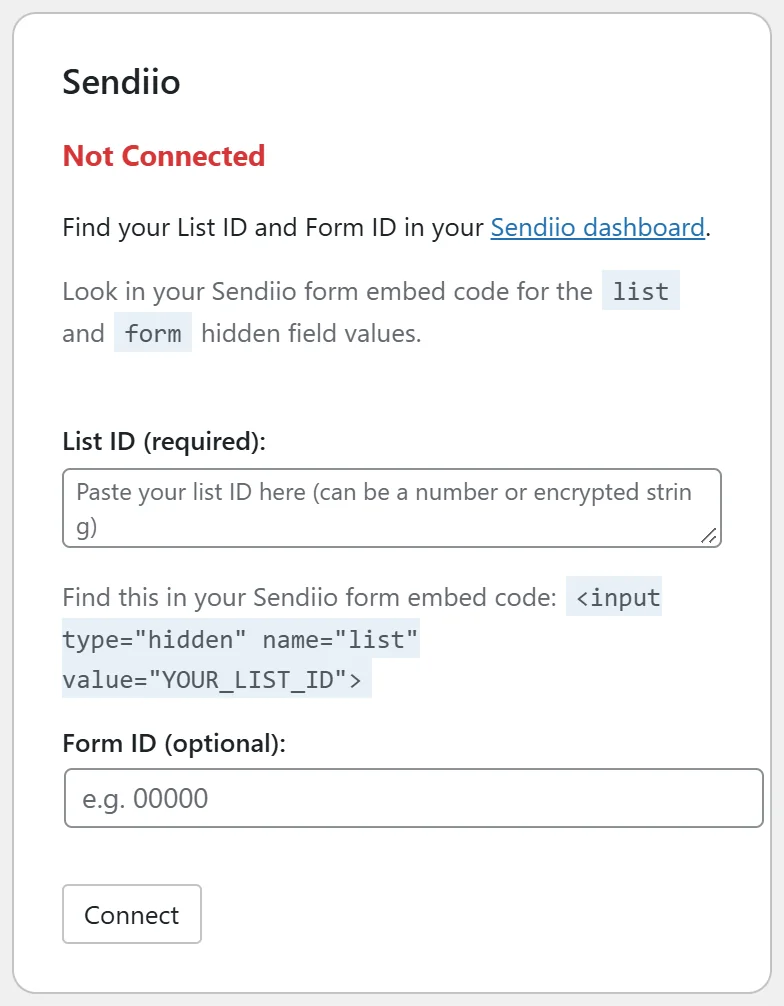
Go to the Autoresponders tab and find the Sendiio card. It should say Connected and show your List ID. Form ID is optional.
Step by step:
- Check the List ID. In Sendiio, open your form's embed code and copy the value of the hidden field named list. Paste it in List ID (required) on the Sendiio card and click Connect.
- Clear your caching plugin's cache and your browser cache, then open the funnel in a private window. An old cached copy of the page may carry an older form.
- Try the funnel with ad blockers and privacy extensions switched off. Some block form scripts.
- Open the browser's developer console (F12 on most computers), submit the form and look for a red message. Send that message to support if you cannot place it.
- Check the Lists tab, Collected Emails. If your test address is there, the save step worked and only the redirect was stopped in the browser.
If the visitor reaches the download page but is not in Sendiio:
The plugin sends the address to Sendiio in the background and cannot read Sendiio's reply. Check the List ID and Form ID match the same Sendiio list, and check Sendiio's own settings for that list, such as double opt-in.
A real example:
A Your Site tester said the Sendiio funnel stayed on Please wait. The funnel worked in a private window, so the tester's browser extension was the cause. Sam also cleared the site cache so every visitor got the current page.
Tips:
- Test every funnel after you change the List ID.
- See Sendiio for the full setup and Plugin Conflicts for caching plugins.