Most messages in the Funnel Builder point straight at the fix. Find the message you see below and follow the steps. The Diagnostics tab is your best friend here, so keep it open in a second browser tab.
If you see "FLBW Funnel Builder requires the Free List Building Website plugin":
- Go to Plugins and activate Free List Building Website.
- Reload the page.
If the Funnel Builder menu items are missing, or the tab says UPGRADE:
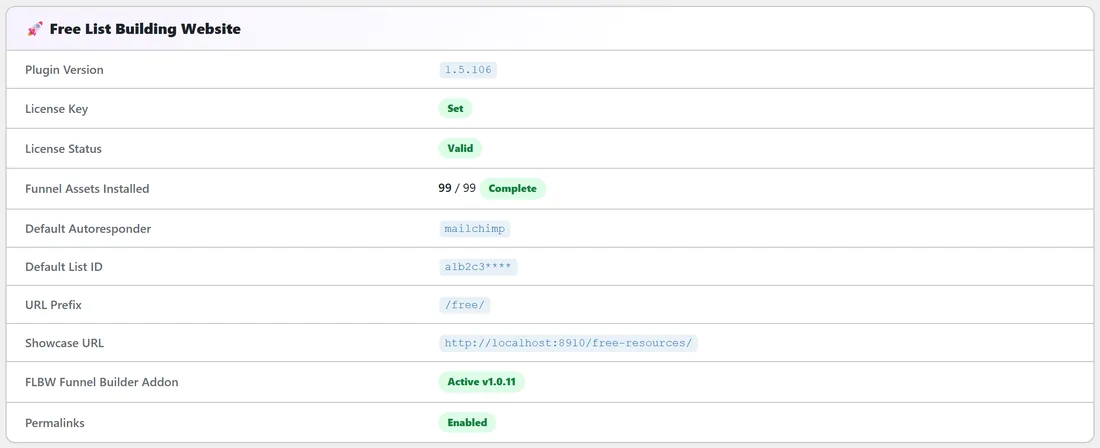
- Go to Plugins and activate FLBW Funnel Builder.
- Open Diagnostics. The row FLBW Funnel Builder Addon should now say Active.
The same fix applies when a funnel's Edit page shows the note about installing the FLBW Funnel Builder addon to use the 9 alternate templates.
If a custom funnel shows a 404 page:
- Open Diagnostics. If Permalinks shows Plain, go to Settings, Permalinks, choose Post name and click Save Changes.
- Check the funnel is switched on. Its Status on My Custom Funnels says Enabled or Disabled; switch it on in the Funnels tab.
- Go to Settings, Permalinks and click Save Changes once more, even if Post name is already chosen. You can also use Flush Rewrite Rules on the plugin's Settings tab.
If saving says "Could not create funnel directory.":
WordPress needs to write to your uploads folder. On the Diagnostics tab, look at uploads/listbuilderpro-assets/ under Critical Plugin Files. If it does not say Present, ask your host to make wp-content/uploads writable, then save again.
If saving says "PDF download failed" or "PDF download returned HTTP" and a number: Your site could not fetch the PDF from that link. Use a direct, public link to the file, or upload the PDF in step 2 instead. The same goes for "Cover image download failed".
If saving says "The selected PDF attachment does not exist.":
The file was removed from the Media Library. Go back to step 2 and choose the PDF again.
If saving says "A PDF source (URL or uploaded file) is required.":
Go back to step 2 and choose a PDF or paste a link. When you edit a funnel, this only shows if the funnel has no PDF on file yet.
If any screen says "Security check failed.":
The page was open a long time. Reload it and try again.
If the CSV import says "Only CSV files are accepted.":
Save the file as .csv, not .xlsx or .numbers, and choose it again.
If the CSV import says "Missing required columns":
Row 1 of the file must be the header row, with title, category, headline, cta_text and pdf_url spelled exactly like that. Files must use commas, not semicolons. Download Sample shows the right layout.
If the CSV import says "CSV file is empty or has no headers.":
Check you picked the right file and that it was saved with content.
If you see row errors after Upload & Validate:
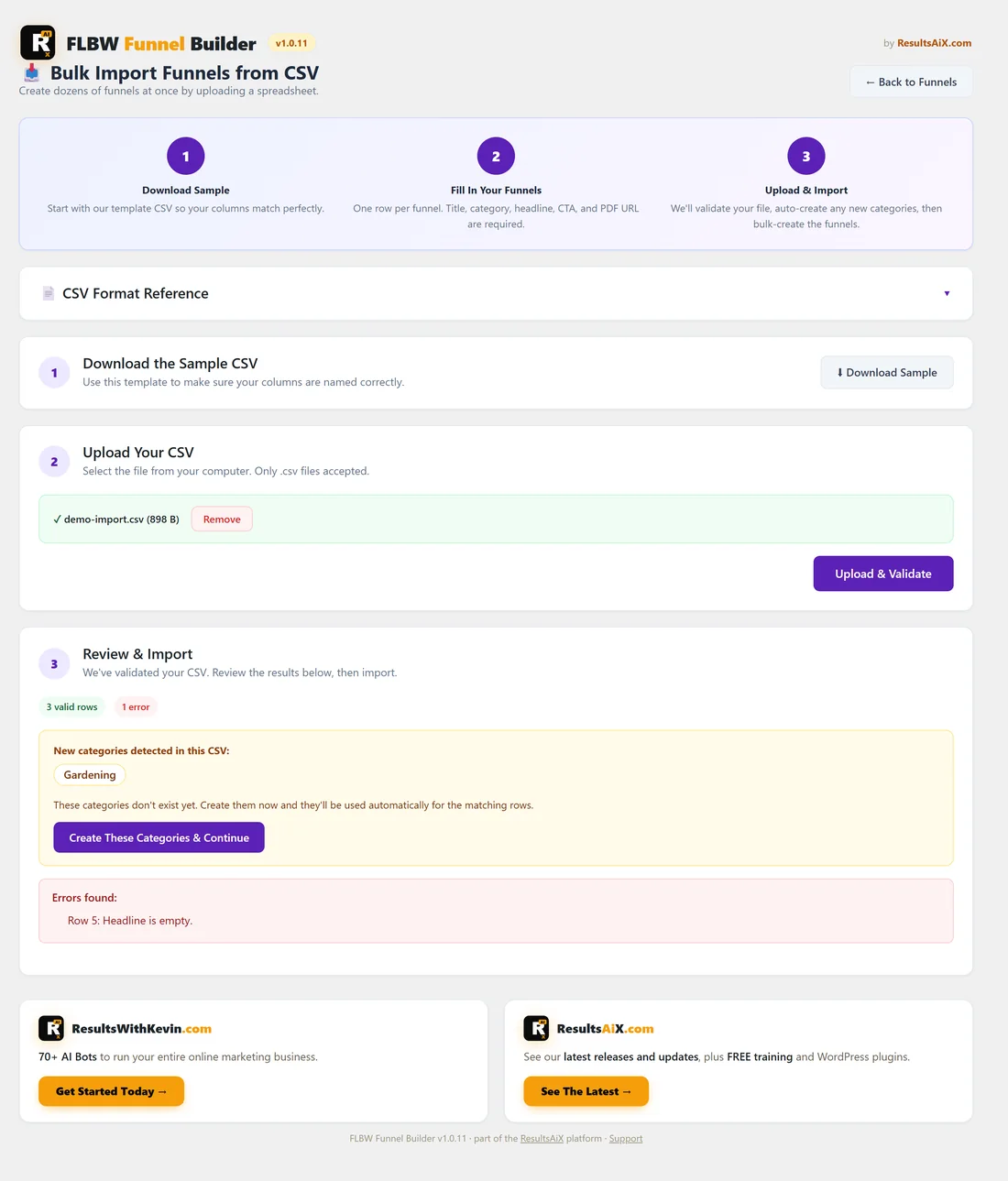
Fix the row in your file and click Upload & Validate again.
- Title is empty, Category is empty, Headline is empty, CTA text is empty or PDF URL is empty: fill in that cell.
- PDF URL is not a valid URL: the link must start with http:// or https://.
- Accent color is not a valid hex color: use a hash sign and 3 to 8 hex digits, for example 10b981 with a hash in front.
- Template ... is not valid: use one of the 9 template names exactly as listed in Funnel Builder: CSV Columns and an Example Row.
If the CSV import says "No validated CSV data found":
A checked file is kept for one hour and is used up by an import. Click Upload & Validate again, then import.
If opt-ins from a custom funnel do not reach your list:
Custom funnels use the main plugin's autoresponder settings. Check the Autoresponders tab and the funnel's Edit page (Settings on My Custom Funnels). On Diagnostics, Default Autoresponder: Not set or Default List ID: Not set means no default is chosen yet.
If Diagnostics lists a caching plugin under Detected Potential Conflicts:
Exclude your funnel addresses (/free/ by default) from that plugin's cache, as the Diagnostics note says.
If Diagnostics recommends 60s or more for asset downloads:
Your Max Execution Time is short. Large CSV imports and PDF links can stop part way. Ask your host to raise it, or import in smaller batches. Re-importing the same file is safe.
If a category stays in the list after you click Delete:
The message "This category is in use by one or more funnels and cannot be deleted." means a funnel still uses it. Move or remove the funnels in that category first. The Funnels column only counts switched-on funnels, so a switched-off funnel can also be using it.
If a CSV category shows under New categories detected but you meant an existing one: The category column takes a slug (email) or a name (Email Marketing), in any letter case. A name that matches neither, for example because of a typo, is treated as a new category. Fix it in your file and click Upload & Validate again.
If a funnel's card has no picture on the Showcase page:
No cover image was added. Click Edit next to the funnel on My Custom Funnels, add a cover in step 3 and click Update Funnel.
Tips:
- When you ask for help, click Copy Full Report To Clipboard on the Diagnostics tab and paste it into your message (see How to Get Support).