The GetResponse card connects through the GetResponse API. In GetResponse, lists are called campaigns, so the plugin shows your campaigns in the list dropdowns. New subscribers are added at day 0 of your autoresponder cycle.
Where to find it:
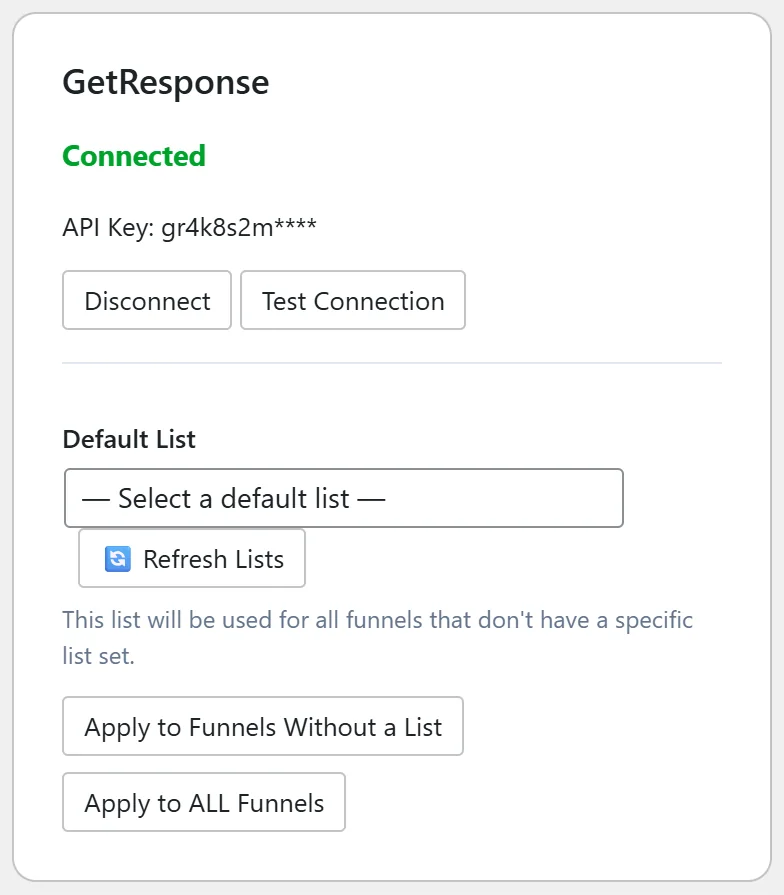
Go to Free List Building → Autoresponders and find the GetResponse card. (The other GetResponse card, called GetResponse (Campaign Token), is a separate method; see GetResponse Legacy (Campaign Token).)
Where to find your API key:
- Log in to GetResponse.
- Open Tools (or the menu) and go to Integrations and API, then API.
- Click Generate API key if you have none, give it a name and copy it.
Step by step:
- Paste the key into API Key on the GetResponse card.
- Click Connect. The card shows Connected and the first characters of the key.
- Click Test Connection to check the key and see how many campaigns were found.
- Choose your campaign in Default List. It is saved as your default straight away.
- Use the Apply buttons to set it on more funnels if needed.
What happens on each opt-in:
The contact is added to the chosen campaign with their email, their name when Collect First Name is on, and day of cycle 0. That means your autoresponder messages that are set to day 0 go out right away, and the rest follow on their days. If the email is already in that campaign, GetResponse keeps the existing contact and the plugin treats it as a success.
Sending one funnel to its own campaign:
On the funnel's edit page choose GetResponse in Autoresponder Provider. The field below is then called Campaign. Pick the campaign there.
A real example:
Sam Rivera points the FREE Sales Funnel Blueprint funnel at the GetResponse campaign yoursite_free_guides. That campaign has a day 0 welcome email that delivers a bonus checklist, then a short series on building a first funnel.
Tips:
- Set your welcome message to day 0 in GetResponse so new subscribers hear from you straight away.
- After you create a new campaign, click Refresh Lists on the card.
- If someone is not added, check Settings → Debug Log for the reply from GetResponse.