ResultsAiX Mailer is the self-hosted email platform from the same family as this plugin. When it runs on the same WordPress site, Free List Building Website can add every opt-in straight to one of your Mailer lists. There is no key to paste and no outside service in between.
It is always the first card on the Autoresponders tab, whether or not the Mailer is installed.
Where to find it:
Go to Free List Building → Autoresponders. The ResultsAiX Mailer card is the first card under Other Autoresponder Connections.
What the card shows:
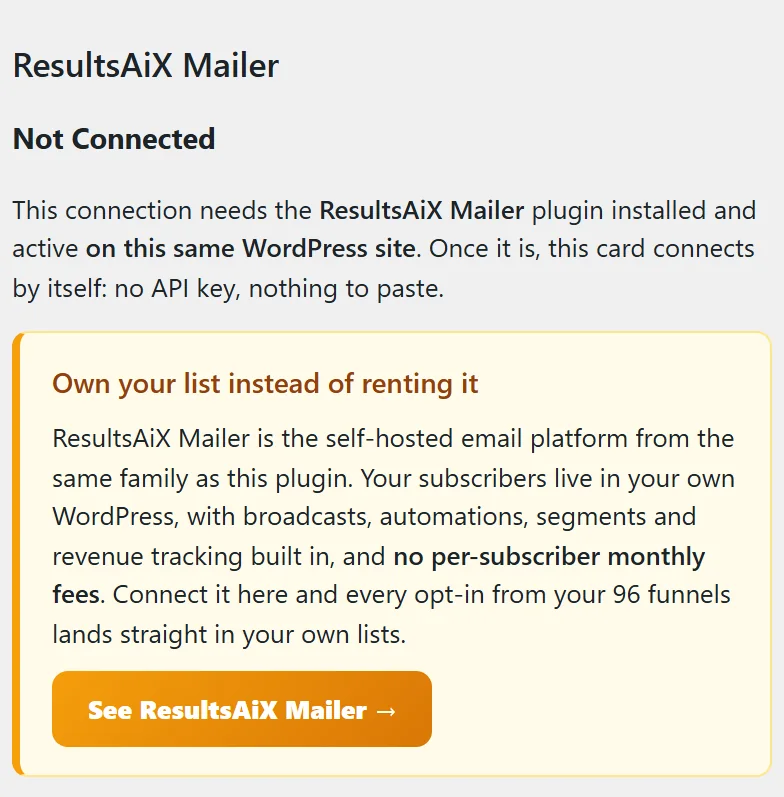
- Not Connected: the Mailer plugin is not active on this site. The card explains that the connection needs the Mailer on this same site, with a See ResultsAiX Mailer button.
- Connected: the Mailer is active. You see a Test Connection button, a Default List dropdown with your Mailer lists, a Refresh Lists button and the two Apply buttons.
Step by step:
- Install and activate ResultsAiX Mailer on the same WordPress site.
- In the Mailer, create a list for your funnel subscribers, for example Free Guide Readers.
- Open Free List Building → Autoresponders. The ResultsAiX Mailer card now says Connected.
- Pick your list in the Default List dropdown. If you just created it, click Refresh Lists first.
- Click Apply to Funnels Without a List to point every funnel that has no list yet at this one, or Apply to ALL Funnels to point every funnel at it.
- Opt in on one of your funnels with a test address and check that it appears in the Mailer list.
How subscribers are added:
- The contact is created or updated in the Mailer with their email and first name (when Collect First Name is on).
- They join the list you chose. Welcome emails, list automations and double opt-in follow that list's own settings in the Mailer.
- An address the Mailer has on its suppression list is not added, and the reason is written to the Debug Log.
- The opt-in is also saved in the plugin's own Lists tab as a backup.
A real example:
Sam Rivera moves yoursite.com from a paid service to ResultsAiX Mailer. Sam creates a list called Free Guide Readers with a three email welcome series, picks it on the card and clicks Apply to ALL Funnels. From then on, every new reader of any free guide gets the welcome series from Sam's own site.
Tips:
- Use a different Mailer list per funnel when you want different follow-up emails. Set it on that funnel's edit page (see Default Autoresponder vs Per-Funnel Overrides).
- Turn on Collect First Name in Settings so your welcome emails can greet people by name.
- See Autoresponder Management Features for the Refresh and Apply buttons.