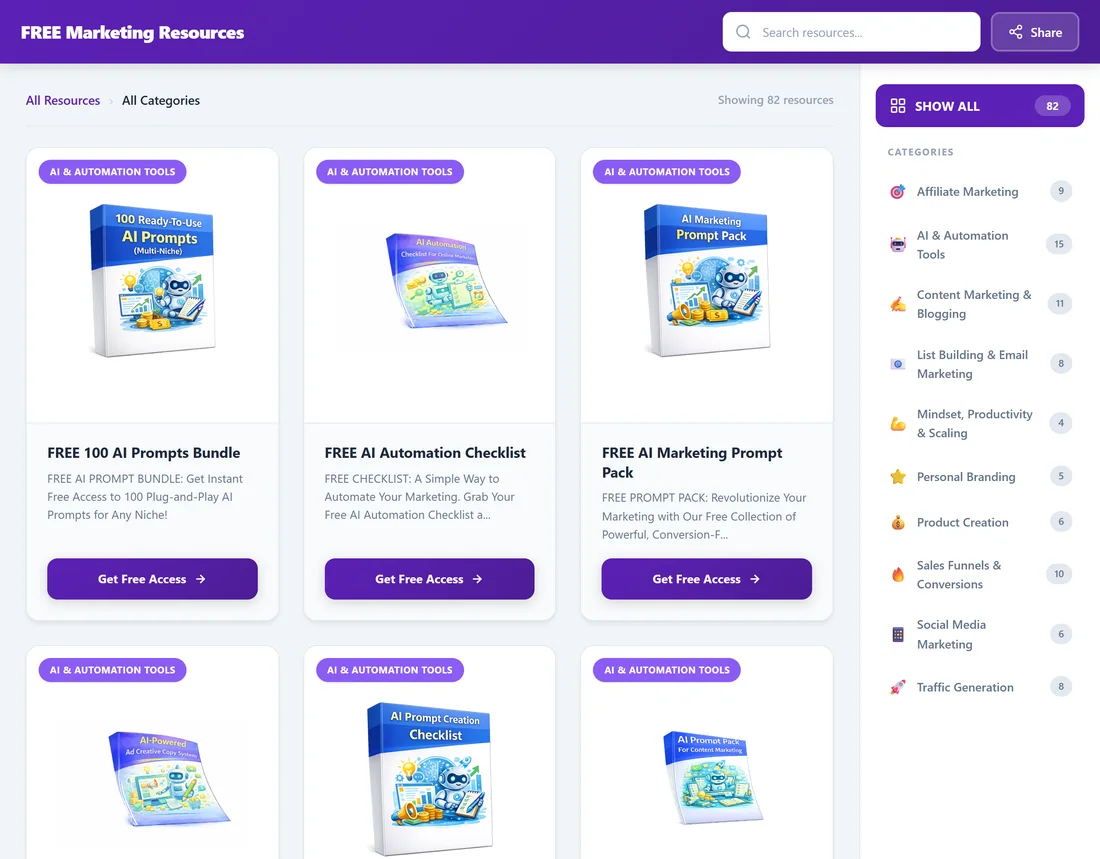
The Showcase page is a catalogue of your free guides. It lists every funnel you have switched on as a card with its cover, title, short description and a button to the squeeze page. Visitors can browse by category, search and share the page.
One link to the Showcase page gives people access to all of your funnels, which makes it handy for your site menu, your social profiles and your email signature.
Where to find it:

Open the Showcase tab in the plugin. The Your Showcase Page box at the top shows the Live URL, for example yoursite.com/free-resources/, and links to its Privacy, Terms, Disclaimer and Contact pages. Click the Live URL to open it.
How it looks:
By default the page is standalone: it uses its own clean design, outside your WordPress theme, with a coloured header bar, a search box and a Share button at the top, the cards in the middle and a category list on the right. On phones the categories become a row of buttons and a menu.
If you would rather it looked like the rest of your site, tick Use My Theme's Header & Footer on the Showcase tab. Your theme's menu shows on top and your footer below, with the grid in between.
What decides what it shows:
- Only funnels that are switched on appear. Switch a funnel off on the Funnels tab and it drops off the page.
- Funnels are grouped by category, with a count next to each category.
- Custom funnels from the Funnel Builder add-on appear in their own categories.
Good uses for it:
- A landing page for all your funnels at once, for example in ads or a link in your bio.
- A Free Resources item in your site menu (Appearance, Menus in WordPress, add a Custom Link with the Live URL).
- Your homepage, using Use as Homepage on the Showcase tab.
A real example:
Sam's Showcase page lives at yoursite.com/free-resources/ with the title FREE Marketing Resources. It shows 82 guides in 10 categories, because Video / YouTube and E-Commerce are switched off. Sam links to it from the Your Site menu and from every Instagram bio.
Tips:
- Pick a theme colour that matches your brand (see Choosing a Theme (7 Options)).
- Set the title, address and button text on the Showcase tab (see Configuring the Showcase Page).
- Visitors can open a single category directly, which makes a good focused link (see Sharing Your Showcase URL).