Free List Building Website installs like any other WordPress plugin. You upload one zip file, click Activate, and then enter your licence key so the full plugin opens up.
Before you start, check that your site meets the System Requirements. You need an administrator login.
Step by step:
- Download the plugin zip from your account portal. Keep it as a zip file, do not unzip it.
- In WordPress, go to Plugins → Add New Plugin and click Upload Plugin at the top.
- Click Choose File, pick the zip file and click Install Now.
- When the upload finishes, click Activate Plugin.
- A new item called Free List Building appears in the left menu. Click it.
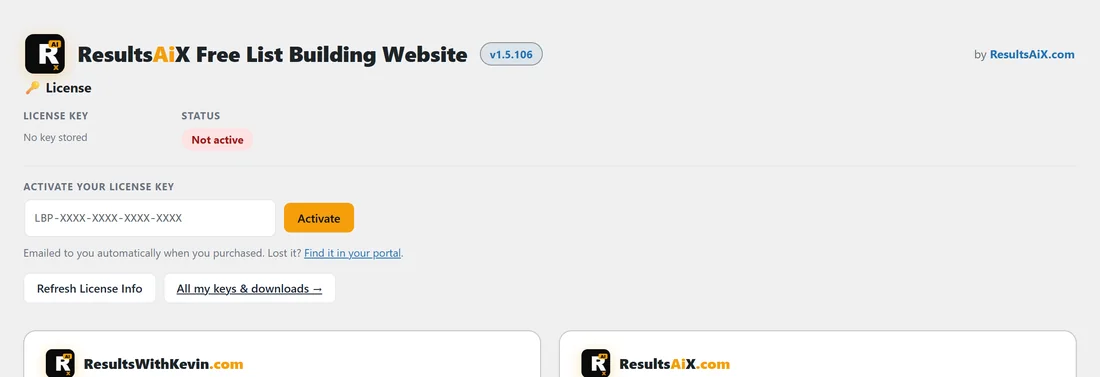
- You see the licence screen. Paste your licence key into the box and click Activate.
- The page reloads with the full plugin: the branded header, the row of tabs and the Dashboard.
What activation does for you:

- It creates the plugin's own database tables for funnel settings, collected emails and stats.
- It creates the folders it needs in wp-content/uploads/listbuilderpro-assets/.
- It sets your permalinks to Post name if they were still on Plain.
- It creates a page called Free Resources for your Showcase page.
Until the licence is active, the Free List Building menu only shows the licence screen, and other admin pages show a small notice with an Activate now link.
A real example:
Sam Rivera downloads the zip from the portal, uploads it on yoursite.com and activates it. The licence screen opens. Sam pastes the key from the purchase email, clicks Activate and lands on the Dashboard with the Welcome box and a Run Setup Wizard button.
Updating later:
New versions arrive in Dashboard → Updates in WordPress, the same as any other plugin. Your funnel settings, collected emails and stats stay in place when you update.
Tips:
- Your licence key was emailed to you when you purchased. The licence screen also has a Find it in your portal link.
- After activation, run the setup wizard. It walks you through the autoresponder, your affiliate link and the funnel files in a few minutes (see The Setup Wizard Walkthrough).
- For more on keys and site slots, see License Activation and License Management.