The Funnel Connection Overview on the Lists tab is a health check for your whole list building website. It shows every funnel, which autoresponder it sends subscribers to, which list it uses, and whether that setup is complete.
Use it after you connect an autoresponder, after you change a funnel's settings, and any time you want to be sure every opt-in lands in the right list.
Where to find it:
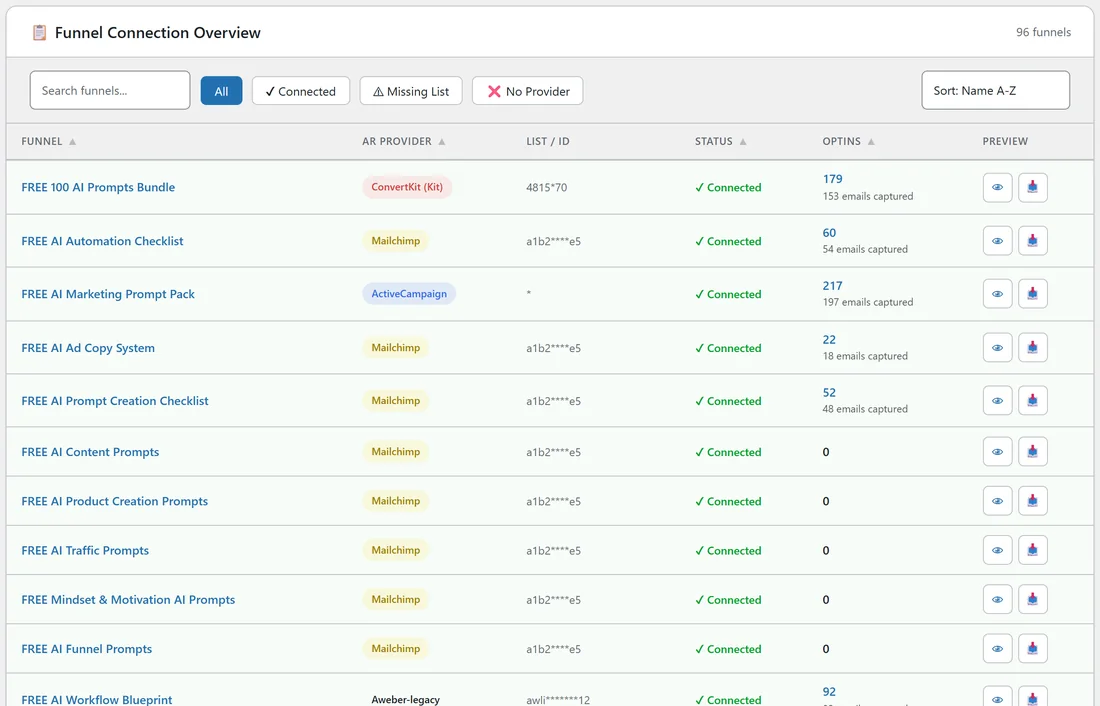
Open Free List Building in the WordPress menu and click the Lists tab. The Funnel Connection Overview is the first table on the page, under the five summary cards. The number of funnels shows on the right of its heading, for example 96 funnels.
What each column shows:
- Funnel: the funnel title. Click it to open that funnel's Edit page.
- AR Provider: the autoresponder this funnel uses, for example Mailchimp, ActiveCampaign or ConvertKit (Kit). A funnel with no setting of its own shows your default autoresponder from Settings.
- List / ID: the list, audience, form or tag the funnel sends to. Only the first 4 and last 2 characters show, the rest are stars, so you can share a screenshot safely.
- Status: Connected, No List or No Provider (see below).
- Optins: how many opt-ins the funnel has had. When the site also received the email address itself, a second line shows how many emails were captured.
- Preview: the eye button opens the squeeze page and the tray button opens the download page, each in a new browser tab.
What the three statuses mean:
- Connected (green tick): the funnel has a provider and a list. New subscribers go straight to that list.
- No List (yellow): the funnel has a provider but no list, form or tag, and no Default List is set in Settings either.
- No Provider (red cross): no autoresponder is set on the funnel and no Default Autoresponder is set in Settings.
How the status is worked out:
The plugin looks at the funnel's own settings first. A blank provider takes the Default Autoresponder from Settings. A blank list takes the Default List from Settings, which is one shared value for all providers. So once a Default List is saved, every funnel with a provider counts as Connected.
That means the status tells you a list is in place, not that it belongs to the provider you picked. If you switch one funnel to a different provider, open its Edit page and choose that provider's own list as well.
Step by step: check your funnels after a change:

- Click the Lists tab.
- Click the Missing List filter, then the No Provider filter. An empty table means every funnel has a provider and a list.
- Click All, then use the Sort drop-down and pick Status to group the rows.
- For any funnel that needs work, click its title, set the Autoresponder section and click Save Funnel Settings.
- Come back to the Lists tab to see the new status.
A real example:
Sam at yoursite.com uses Mailchimp for most funnels, with "Your Site Newsletter" as the Default List. The Email List Building Checklist funnel goes to the ActiveCampaign list "Email Marketing Leads", and the 100 AI Prompts Bundle goes to a ConvertKit form. All 96 rows show Connected, and the AR Provider badges make the three different providers easy to spot.
Tips:
- Use the eye and tray buttons to test a funnel end to end: open the squeeze page, opt in with your own address, and check it arrives in your autoresponder.
- The table lists every funnel, including ones you switched off on the Funnels tab, so you can set them up before you switch them on.
- To change many funnels at once, use the Apply to Funnels buttons on the Autoresponders tab (see Autoresponder Management Features).
- See Summary Statistics for the cards above this table, and Default Autoresponder vs Per-Funnel Overrides for how the two levels work together.