Each funnel is served at its own address on your domain. No WordPress pages or posts are created: the plugin answers those addresses directly, so your Pages list stays clean.
Knowing the pattern helps you share the right link and set up tracking.
Where to see a funnel's address:
- On the funnel's Edit page, in Funnel Status (Funnel URL) and in the Preview section.
- On the Traffic Toolkit page for the funnel, with a Copy Link button.
- In Settings, under URL Prefix, which shows the pattern for your site.
The parts of the address:

The squeeze page address is your site, then the URL Prefix, then the funnel's folder name: yoursite.com/free/EmailListBuildingChecklist/
- URL Prefix: free by default. Change it in Settings. It can hold lowercase letters, numbers and hyphens.
- Funnel folder name: fixed for the 96 built-in funnels, for example EmailListBuildingChecklist. Custom funnels from the Funnel Builder add-on use the URL Slug you chose.
Every page of a funnel:
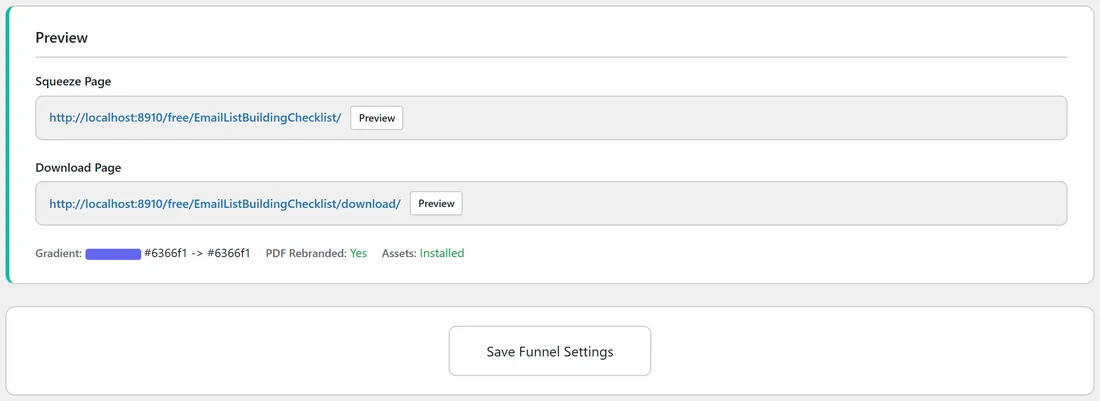
- Squeeze page: yoursite.com/free/EmailListBuildingChecklist/
- Download page: yoursite.com/free/EmailListBuildingChecklist/download/
- Privacy, terms and disclaimer: the same address ending in privacy/, terms/ or disclaimer/
- The prefix on its own, yoursite.com/free/, sends visitors to your Showcase page.
The older addresses ending in .html, such as download.html, still work. The plugin now links to the shorter versions without .html because some hosts block .html addresses before WordPress can answer them.
Changing the URL Prefix:
- Open the Settings tab.
- Type the new prefix in URL Prefix, for example guides.
- Click Save Settings.
The plugin refreshes WordPress's address rules for you when the prefix changes, so the new addresses work straight away: yoursite.com/guides/EmailListBuildingChecklist/.
Using no prefix:
Leave URL Prefix blank to serve funnels at the root of your site, for example yoursite.com/EmailListBuildingChecklist/. In this mode the plugin only answers the exact funnel folder names, so your other pages keep working.
A real example:
Sam keeps the default prefix free, because it tells readers the guide costs nothing. The links Sam shares look like yoursite.com/free/AIWorkflowBlueprint/. On Facebook, the funnel's designed share image shows under the link.
Tips:
- Choose your prefix before you start sharing links. Links shared with the old prefix point to the old addresses after a change, so update them in your posts and emails if you switch.
- If a funnel address shows Page Not Found, check the funnel is switched on, then see "404 Error on Funnel Pages".
- Your WordPress permalinks must be set to Post name for these addresses to work (Settings, Permalinks in WordPress).