To keep the plugin fast, it remembers the lists from each autoresponder for 24 hours instead of asking the provider on every page load. A list you made in your autoresponder a few minutes ago will not be in the dropdown until you ask for a fresh copy.
Where to find it:
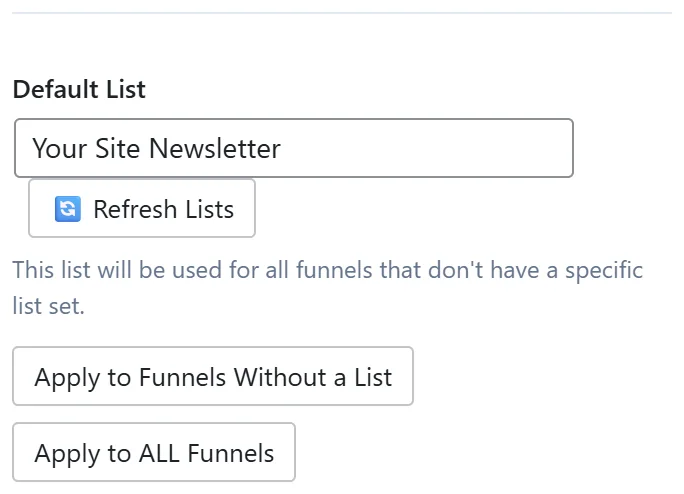
Go to Free List Building and click the Autoresponders tab. Every connected API provider's card has a Default List dropdown with a 🔄 Refresh Lists button next to it. For GoHighLevel and Systeme.io, which use tags, the button is called Refresh Tags.
Step by step:
- Make sure the new list exists in your autoresponder account and has a name.
- On the provider's card, click 🔄 Refresh Lists (or Refresh Tags).
- Open the Default List dropdown and choose the new list.
- To use the list on one funnel only, open that funnel's Edit page. The list dropdown there uses the same fresh copy.
If the list still does not appear:
- Check you are looking at the right card. A Mailchimp audience only shows on the Mailchimp card.
- Click Test Connection on the card. If the connection has stopped working, the dropdown stays empty. Reconnect with a fresh API key.
- Some providers only list items your API key is allowed to see. For GoHighLevel, the Private Integration needs the scopes listed on its card, including View Tags.
- Read Settings, Debug Log for a line from that provider.
If your provider has no dropdown:
AWeber, Sendiio, GetResponse (Campaign Token), LeadsLeap and Encharge use a typed value instead of a dropdown, so there is nothing to refresh. Type the list name, ID, token or tag in the field on the card or on the funnel's Edit page.
A real example:
Sam made a new Mailchimp audience called Workshop Signups for Your Site's webinar funnel. It was not in the dropdown, so Sam clicked 🔄 Refresh Lists on the Mailchimp card. The audience appeared and Sam picked it on that funnel's Edit page.
Tips:
- Refresh after renaming a list too, so the new name shows.
- See Autoresponder Management Features for the Default List, Apply to Funnels Without a List and Apply to ALL Funnels buttons.