You can see how each funnel performs without any outside analytics tool. The plugin records visits and opt-ins as they happen and adds them up for you.
Where to find the numbers:

- Dashboard tab: lifetime totals and your Top Performing Funnels.
- A funnel's Edit page: the stats cards for that funnel (see Per-Funnel Stats Cards).
- Lists tab: opt-ins and emails captured for every funnel, and the Collected Emails list.
What is measured:
- Page Views: each time a real visitor opens a funnel's squeeze page.
- Opt-ins: each time a real visitor reaches a funnel's download page. Reaching the download page means they opted in, so this works for every autoresponder, including providers whose own form takes the email.
- Conversion Rate: opt-ins divided by page views, as a percentage.
- Emails captured: how many email addresses your site itself received and passed to your autoresponder. It shows under Opt-ins on the Dashboard and on the Lists tab.
- Funnels Installed: how many funnels have their files on your server, for example 96 / 96.
How counting works:
- Visits by search engines and other bots are skipped (see Bot Exclusion).
- Visits by logged-in administrators are skipped, so your own testing does not count (see Admin Tracking Exclusion).
- Numbers are kept per funnel per day and the screens show lifetime totals.
Opt-ins and emails captured:
The two numbers answer slightly different questions. Opt-ins counts arrivals on download pages. Emails captured counts the addresses your site actually received. For the exact number of new subscribers, use emails captured and your autoresponder's own count.
Top Performing Funnels:
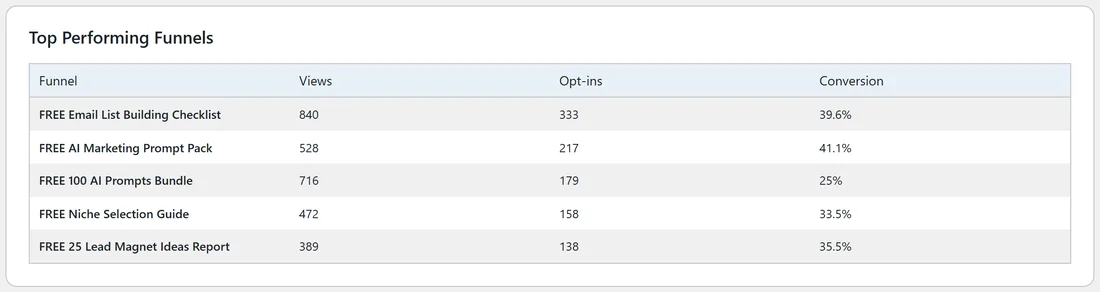
The Dashboard lists your five funnels with the most opt-ins, with their Views, Opt-ins and Conversion. It is the quickest way to see what to promote more.
A real example:
After six weeks the Your Site Dashboard shows 5576 page views, 1833 opt-ins and 1669 emails captured. Top of the list is FREE Email List Building Checklist with 840 views, 333 opt-ins and a 39.6% conversion rate. Sam gives that funnel its own download page offer and promotes it twice a week.
Tips:
- Compare funnels by Conversion as well as Views: a funnel with fewer views and a high rate is a good one to promote.
- For visitor sources and paths, add Google Analytics (see Google Analytics GA4 Integration).
- For ad pixels and conversion events, see Custom Tracking Codes.