The plugin needs an active licence key before its tabs open. Until then, Free List Building shows only the licence screen. If Activate does not work, the message under the box tells you what to do next.
Where to find it:
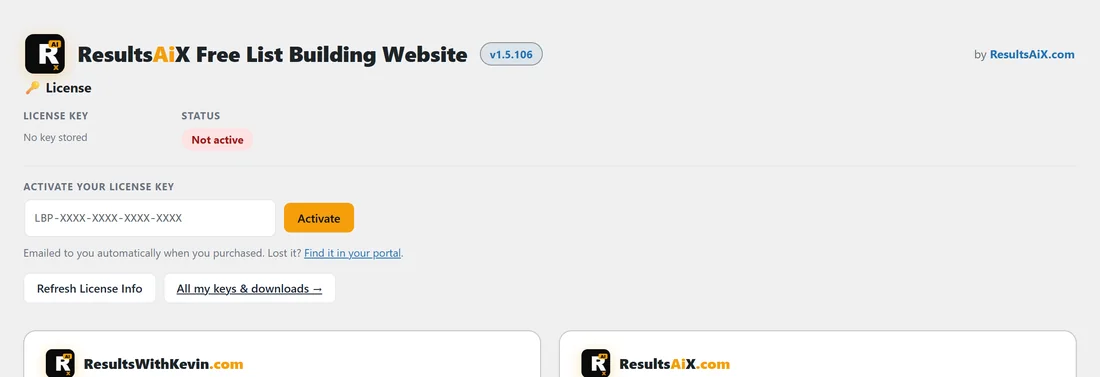
On a new install, click Free List Building in the WordPress sidebar: the licence screen opens. On a licensed site the same licence panel sits at the top of the Settings tab.
Step by step:
- Copy the key from your purchase email or from your account portal (the Find it in your portal link under the box).
- Paste it into the box (it looks like LBP-XXXX-XXXX-XXXX-XXXX). Check there is no space before or after it.
- Click Activate.
- When it works, the Status shows Active and Activated Domains lists your site.
If the message says your sites are all in use:
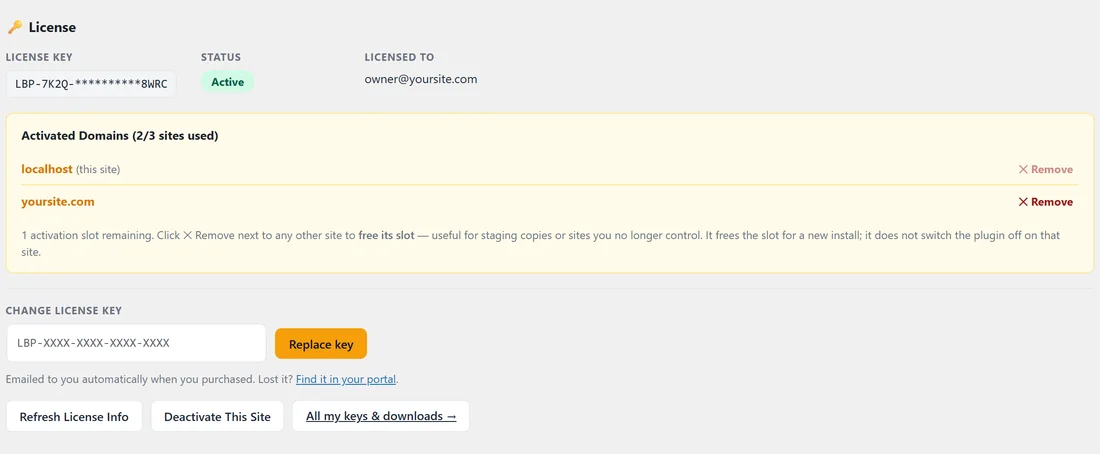
Each key covers a set number of sites. The licence panel on any active site shows them under Activated Domains, for example (2/3 sites used).
- Log in to a site that already has the key and open the Settings tab.
- In Activated Domains, click × Remove next to a site you no longer use, such as an old staging copy. This frees its slot.
- Or, on the site you are leaving, click Deactivate This Site.
- Go back to the new site and click Activate again.
If the old site no longer exists:
Use × Remove next to it from any site that still has the key, or open a ticket and support will free the slot for you. See How to Get Support.
If you see "Too many requests. Please try again in a minute.":
Wait a minute and click Activate once.
If you see "Could not reach the license server" or "Invalid response from license server.": Your server could not talk to the licence server. Try again in a few minutes. If it continues, ask your host whether outgoing connections are blocked by a firewall, and send support your Diagnostics report.
A real example:
Sam moved Your Site's funnels to a new domain. Activate said all sites were in use, because the old staging copy still held a slot. Sam clicked × Remove next to the staging domain on the main site, then Activate on the new site worked.
Tips:
- Refresh License Info re-reads your licence from the server and reconnects updates. It is the button to press if updates say the site is not connected.
- All my keys & downloads opens your account portal. See License Management.