The Funnel Builder is a separate plugin that adds to Free List Building Website. This page lists what you need, how to install it, and two quick ways to confirm it is active.
Before you start:
- WordPress 5.6 or later and PHP 7.4 or later.
- The Free List Building Website plugin installed, activated and licensed. The add-on works through the main plugin and does nothing on its own.
- Permalinks set to Post name (Settings, Permalinks). Funnel pages need pretty web addresses.
- Your autoresponder connected in the main plugin. Custom funnels send opt-ins to the same place as your built-in funnels.
- An administrator login.
- Your PDF lead magnet, either as a file on your computer or as a direct link to the PDF.
- Optional: a cover image, square or portrait, at least 400 by 400 pixels.
There is no separate licence key for this add-on. Your Free List Building Website licence is all you need.
Step by step:
- Log in to your members area and download the Funnel Builder add-on. You get flbw-funnel-builder.zip. Keep it zipped.
- Make sure the Free List Building Website plugin is already installed and active.
- In WordPress go to Plugins, Add New, Upload Plugin.
- Click Choose File, pick flbw-funnel-builder.zip and click Install Now.
- Click Activate Plugin.
- Open the Free List Building menu in the WordPress sidebar. You now see four new items: Funnel Builder, CSV Import, My Custom Funnels and Categories.
How to check it worked:

- The plugin's tab bar shows Funnel Builder with a green ACTIVE badge on the right. Before the add-on is active, the same tab shows a pink UPGRADE badge.
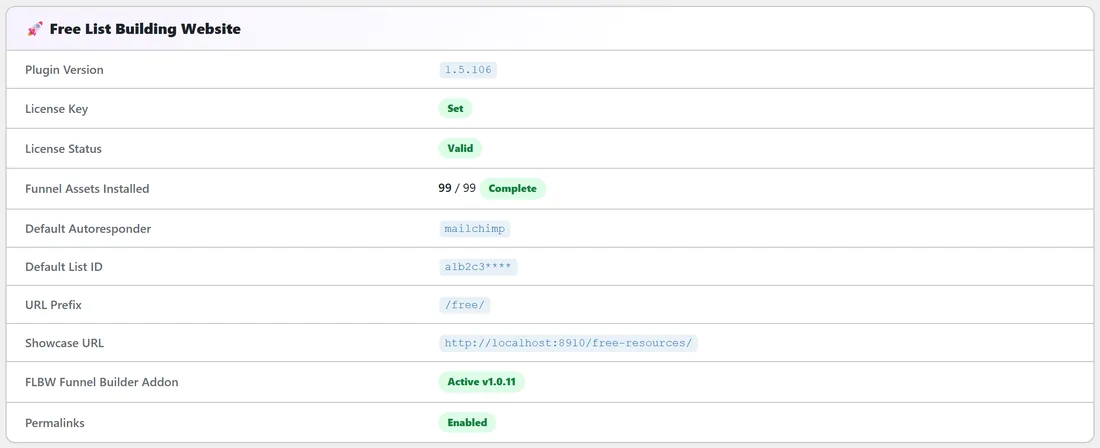
- The Diagnostics tab shows FLBW Funnel Builder Addon: Active v1.0.11 in the Free List Building Website section.
- Funnel Assets Installed on Diagnostics now counts your custom funnels too, for example 99 / 99 with three custom funnels.
Updates:
Updates arrive in Dashboard, Updates, like any other plugin. Click Update Now when a new version shows.
A real example:
Sam uploaded the zip on yoursite.com, activated it, and opened Diagnostics. The row read Active v1.0.11, and the tab bar showed Funnel Builder ACTIVE. Sam then went straight to Categories to add a Podcasting category before building the first funnel.
Tips:
- If the WordPress screen shows a notice that FLBW Funnel Builder needs the Free List Building Website plugin, activate the main plugin first, then reload.
- Next, read Funnel Builder: The My Custom Funnels Screen to get your bearings.